
Heiman M1-PE
| Model | M1-PE |
| Vendor | Heiman |
| Description | Smart occupancy sensor |
| Exposes | battery, occupancy, illuminance, temperature, humidity, target_distance, fault_state, identify, unoccupied_delay, radar_detection_min_range, radar_detection_max_range, illuminance_threshold, sensitivity_level, work_mode, temperature_offset, humidity_offset, learning_control, learning_state, work_indicator, reported_packages, rejoin_count, reboot_count |
| Picture | 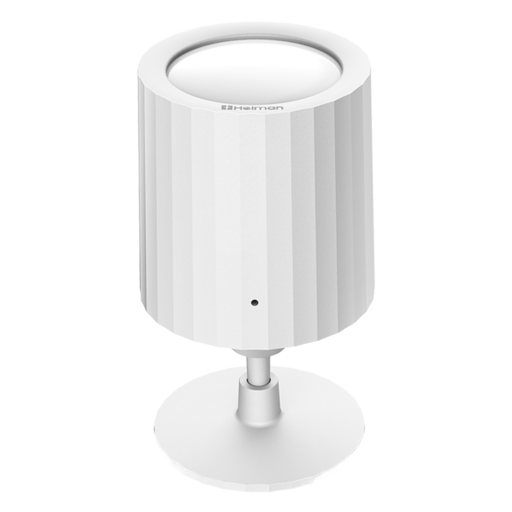 |
OTA updates
This device supports OTA updates, for more information see OTA updates.
Options
How to use device type specific configuration
illuminance_calibration: Calibrates the illuminance value (percentual offset), takes into effect on next report of device. The value must be a number.temperature_calibration: Calibrates the temperature value (absolute offset), takes into effect on next report of device. The value must be a number.temperature_precision: Number of digits after decimal point for temperature, takes into effect on next report of device. This option can only decrease the precision, not increase it. The value must be a number with a minimum value of0and with a maximum value of3humidity_calibration: Calibrates the humidity value (absolute offset), takes into effect on next report of device. The value must be a number.humidity_precision: Number of digits after decimal point for humidity, takes into effect on next report of device. This option can only decrease the precision, not increase it. The value must be a number with a minimum value of0and with a maximum value of3identify_timeout: Sets the duration of the identification procedure in seconds (i.e., how long the device would flash).The value ranges from 1 to 30 seconds (default: 3). The value must be a number with a minimum value of1and with a maximum value of30no_occupancy_since: Sends a message after the last time no occupancy (occupancy: false) was detected. When setting this for example to [10, 60] a{"no_occupancy_since": 10}will be sent after 10 seconds and a{"no_occupancy_since": 60}after 60 seconds. The value must be a list of numbers.illuminance_raw: Expose the raw illuminance value. The value must betrueorfalse
Exposes
Battery (numeric)
Remaining battery in %. Value can be found in the published state on the battery property. To read (/get) the value publish a message to topic zigbee2mqtt/FRIENDLY_NAME/get with payload {"battery": ""}. It's not possible to write (/set) this value. The minimal value is 0 and the maximum value is 100. The unit of this value is %.
Occupancy (binary)
Indicates whether the device detected occupancy. Value can be found in the published state on the occupancy property. To read (/get) the value publish a message to topic zigbee2mqtt/FRIENDLY_NAME/get with payload {"occupancy": ""}. It's not possible to write (/set) this value. If value equals true occupancy is ON, if false OFF.
Illuminance (numeric)
Measured illuminance. Value can be found in the published state on the illuminance property. To read (/get) the value publish a message to topic zigbee2mqtt/FRIENDLY_NAME/get with payload {"illuminance": ""}. It's not possible to write (/set) this value. The unit of this value is lx.
Temperature (numeric)
Measured temperature value. Value can be found in the published state on the temperature property. To read (/get) the value publish a message to topic zigbee2mqtt/FRIENDLY_NAME/get with payload {"temperature": ""}. It's not possible to write (/set) this value. The unit of this value is °C.
Humidity (numeric)
Measured relative humidity. Value can be found in the published state on the humidity property. To read (/get) the value publish a message to topic zigbee2mqtt/FRIENDLY_NAME/get with payload {"humidity": ""}. It's not possible to write (/set) this value. The unit of this value is %.
Target distance (numeric)
The distance of target. Value can be found in the published state on the target_distance property. To read (/get) the value publish a message to topic zigbee2mqtt/FRIENDLY_NAME/get with payload {"target_distance": ""}. It's not possible to write (/set) this value. The minimal value is 1 and the maximum value is 10. The unit of this value is m.
Fault state (text)
device fault state. Value can be found in the published state on the fault_state property. To read (/get) the value publish a message to topic zigbee2mqtt/FRIENDLY_NAME/get with payload {"fault_state": ""}. It's not possible to write (/set) this value.
Identify (enum)
Initiate device identification. Value will not be published in the state. It's not possible to read (/get) this value. To write (/set) a value publish a message to topic zigbee2mqtt/FRIENDLY_NAME/set with payload {"identify": NEW_VALUE}. The possible values are: identify.
Unoccupied delay (numeric)
occupied to unoccupied delay. Value can be found in the published state on the unoccupied_delay property. To read (/get) the value publish a message to topic zigbee2mqtt/FRIENDLY_NAME/get with payload {"unoccupied_delay": ""}. To write (/set) a value publish a message to topic zigbee2mqtt/FRIENDLY_NAME/set with payload {"unoccupied_delay": NEW_VALUE}. The minimal value is 5 and the maximum value is 3600. The unit of this value is s.
Radar detection min range (numeric)
The minimum detection range of the radar. Value can be found in the published state on the radar_detection_min_range property. To read (/get) the value publish a message to topic zigbee2mqtt/FRIENDLY_NAME/get with payload {"radar_detection_min_range": ""}. To write (/set) a value publish a message to topic zigbee2mqtt/FRIENDLY_NAME/set with payload {"radar_detection_min_range": NEW_VALUE}. The minimal value is 0 and the maximum value is 6. The unit of this value is m.
Radar detection max range (numeric)
The maximum detection range of the radar. Value can be found in the published state on the radar_detection_max_range property. To read (/get) the value publish a message to topic zigbee2mqtt/FRIENDLY_NAME/get with payload {"radar_detection_max_range": ""}. To write (/set) a value publish a message to topic zigbee2mqtt/FRIENDLY_NAME/set with payload {"radar_detection_max_range": NEW_VALUE}. The minimal value is 0 and the maximum value is 6. The unit of this value is m.
Illuminance threshold (numeric)
when the illuminance exceeds the threshold, it activates local linkages.. Value can be found in the published state on the illuminance_threshold property. To read (/get) the value publish a message to topic zigbee2mqtt/FRIENDLY_NAME/get with payload {"illuminance_threshold": ""}. To write (/set) a value publish a message to topic zigbee2mqtt/FRIENDLY_NAME/set with payload {"illuminance_threshold": NEW_VALUE}. The minimal value is 0 and the maximum value is 1000. The unit of this value is lx.
Sensitivity level (enum)
The sensitivity of Sensor. Value can be found in the published state on the sensitivity_level property. To read (/get) the value publish a message to topic zigbee2mqtt/FRIENDLY_NAME/get with payload {"sensitivity_level": ""}. To write (/set) a value publish a message to topic zigbee2mqtt/FRIENDLY_NAME/set with payload {"sensitivity_level": NEW_VALUE}. The possible values are: low, medium, high.
Work mode (enum)
occupany sensor work mode. Value can be found in the published state on the work_mode property. To read (/get) the value publish a message to topic zigbee2mqtt/FRIENDLY_NAME/get with payload {"work_mode": ""}. To write (/set) a value publish a message to topic zigbee2mqtt/FRIENDLY_NAME/set with payload {"work_mode": NEW_VALUE}. The possible values are: pir, radar, pir_and_radar.
Temperature offset (numeric)
used for temperature offset, unit: ℃. Value can be found in the published state on the temperature_offset property. To read (/get) the value publish a message to topic zigbee2mqtt/FRIENDLY_NAME/get with payload {"temperature_offset": ""}. To write (/set) a value publish a message to topic zigbee2mqtt/FRIENDLY_NAME/set with payload {"temperature_offset": NEW_VALUE}. The minimal value is -15 and the maximum value is 15.
Humidity offset (numeric)
used for humidity offset, unit: RH%. Value can be found in the published state on the humidity_offset property. To read (/get) the value publish a message to topic zigbee2mqtt/FRIENDLY_NAME/get with payload {"humidity_offset": ""}. To write (/set) a value publish a message to topic zigbee2mqtt/FRIENDLY_NAME/set with payload {"humidity_offset": NEW_VALUE}. The minimal value is -15 and the maximum value is 15.
Learning control (binary)
Radar learning mode, please wake up the device first.. Value can be found in the published state on the learning_control property. To read (/get) the value publish a message to topic zigbee2mqtt/FRIENDLY_NAME/get with payload {"learning_control": ""}. To write (/set) a value publish a message to topic zigbee2mqtt/FRIENDLY_NAME/set with payload {"learning_control": NEW_VALUE}. If value equals start learning control is ON, if reset OFF.
Learning state (enum)
radar learning state. Value can be found in the published state on the learning_state property. To read (/get) the value publish a message to topic zigbee2mqtt/FRIENDLY_NAME/get with payload {"learning_state": ""}. It's not possible to write (/set) this value. The possible values are: normal, learning, completed, failed.
Work indicator (binary)
Enable/disable the indicator on product. Value can be found in the published state on the work_indicator property. To read (/get) the value publish a message to topic zigbee2mqtt/FRIENDLY_NAME/get with payload {"work_indicator": ""}. To write (/set) a value publish a message to topic zigbee2mqtt/FRIENDLY_NAME/set with payload {"work_indicator": NEW_VALUE}. If value equals On work indicator is ON, if Off OFF.
Reported packages (numeric)
for diagnostic purpose, how many zigbee packages has the reported in a day.. Value can be found in the published state on the reported_packages property. To read (/get) the value publish a message to topic zigbee2mqtt/FRIENDLY_NAME/get with payload {"reported_packages": ""}. It's not possible to write (/set) this value. The minimal value is 0 and the maximum value is 60000.
Rejoin count (numeric)
for diagnostic purpose, how many times has the product rejoined to zigbee network.. Value can be found in the published state on the rejoin_count property. To read (/get) the value publish a message to topic zigbee2mqtt/FRIENDLY_NAME/get with payload {"rejoin_count": ""}. It's not possible to write (/set) this value. The minimal value is 0 and the maximum value is 60000.
Reboot count (numeric)
for diagnostic purpose, how many times has the product rebooted.. Value can be found in the published state on the reboot_count property. To read (/get) the value publish a message to topic zigbee2mqtt/FRIENDLY_NAME/get with payload {"reboot_count": ""}. It's not possible to write (/set) this value. The minimal value is 0 and the maximum value is 60000.