
Pulsar LLC LPC-V1
| Model | LPC-V1 |
| Vendor | Pulsar LLC |
| Description | Leak protection controller |
| Exposes | water_leak_alarm_1, water_leak_alarm_2, tamper, battery_low, switch (state) |
| Picture | 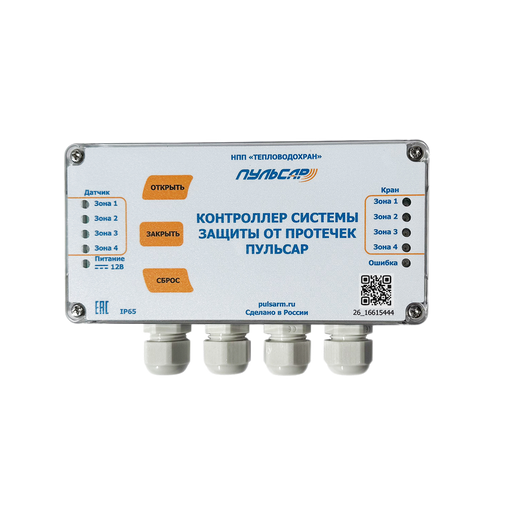 |
Options
How to use device type specific configuration
state_action: State actions will also be published as 'action' when true (default false). The value must betrueorfalse
Exposes
Water leak alarm 1 (binary)
Indicates whether the device detected a water leak (alarm_1). Value can be found in the published state on the water_leak_alarm_1 property. It's not possible to read (/get) or write (/set) this value. If value equals true water leak alarm 1 is ON, if false OFF.
Water leak alarm 2 (binary)
Indicates whether the device detected a water leak (alarm_2). Value can be found in the published state on the water_leak_alarm_2 property. It's not possible to read (/get) or write (/set) this value. If value equals true water leak alarm 2 is ON, if false OFF.
Tamper (binary)
Indicates whether the device is tampered. Value can be found in the published state on the tamper property. It's not possible to read (/get) or write (/set) this value. If value equals true tamper is ON, if false OFF.
Battery low (binary)
Indicates whether the battery of the device is almost empty. Value can be found in the published state on the battery_low property. It's not possible to read (/get) or write (/set) this value. If value equals true battery low is ON, if false OFF.
Switch (2 endpoint)
The current state of this switch is in the published state under the state_2 property (value is ON or OFF). To control this switch publish a message to topic zigbee2mqtt/FRIENDLY_NAME/set with payload {"state_2": "ON"}, {"state_2": "OFF"} or {"state_2": "TOGGLE"}. To read the current state of this switch publish a message to topic zigbee2mqtt/FRIENDLY_NAME/get with payload {"state_2": ""}.
On with timed off
When setting the state to ON, it might be possible to specify an automatic shutoff after a certain amount of time. To do this add an additional property on_time to the payload which is the time in seconds the state should remain on. Additionally an off_wait_time property can be added to the payload to specify the cooldown time in seconds when the switch will not answer to other on with timed off commands. Support depends on the switch firmware. Some devices might require both on_time and off_wait_time to work Examples : {"state" : "ON", "on_time": 300}, {"state" : "ON", "on_time": 300, "off_wait_time": 120}.
Switch (3 endpoint)
The current state of this switch is in the published state under the state_3 property (value is ON or OFF). To control this switch publish a message to topic zigbee2mqtt/FRIENDLY_NAME/set with payload {"state_3": "ON"}, {"state_3": "OFF"} or {"state_3": "TOGGLE"}. To read the current state of this switch publish a message to topic zigbee2mqtt/FRIENDLY_NAME/get with payload {"state_3": ""}.
On with timed off
When setting the state to ON, it might be possible to specify an automatic shutoff after a certain amount of time. To do this add an additional property on_time to the payload which is the time in seconds the state should remain on. Additionally an off_wait_time property can be added to the payload to specify the cooldown time in seconds when the switch will not answer to other on with timed off commands. Support depends on the switch firmware. Some devices might require both on_time and off_wait_time to work Examples : {"state" : "ON", "on_time": 300}, {"state" : "ON", "on_time": 300, "off_wait_time": 120}.
Switch (4 endpoint)
The current state of this switch is in the published state under the state_4 property (value is ON or OFF). To control this switch publish a message to topic zigbee2mqtt/FRIENDLY_NAME/set with payload {"state_4": "ON"}, {"state_4": "OFF"} or {"state_4": "TOGGLE"}. To read the current state of this switch publish a message to topic zigbee2mqtt/FRIENDLY_NAME/get with payload {"state_4": ""}.
On with timed off
When setting the state to ON, it might be possible to specify an automatic shutoff after a certain amount of time. To do this add an additional property on_time to the payload which is the time in seconds the state should remain on. Additionally an off_wait_time property can be added to the payload to specify the cooldown time in seconds when the switch will not answer to other on with timed off commands. Support depends on the switch firmware. Some devices might require both on_time and off_wait_time to work Examples : {"state" : "ON", "on_time": 300}, {"state" : "ON", "on_time": 300, "off_wait_time": 120}.
Switch (5 endpoint)
The current state of this switch is in the published state under the state_5 property (value is ON or OFF). To control this switch publish a message to topic zigbee2mqtt/FRIENDLY_NAME/set with payload {"state_5": "ON"}, {"state_5": "OFF"} or {"state_5": "TOGGLE"}. To read the current state of this switch publish a message to topic zigbee2mqtt/FRIENDLY_NAME/get with payload {"state_5": ""}.
On with timed off
When setting the state to ON, it might be possible to specify an automatic shutoff after a certain amount of time. To do this add an additional property on_time to the payload which is the time in seconds the state should remain on. Additionally an off_wait_time property can be added to the payload to specify the cooldown time in seconds when the switch will not answer to other on with timed off commands. Support depends on the switch firmware. Some devices might require both on_time and off_wait_time to work Examples : {"state" : "ON", "on_time": 300}, {"state" : "ON", "on_time": 300, "off_wait_time": 120}.