
Mifra KS-604S
| Model | KS-604S |
| Vendor | Mifra |
| Description | 2 gang wall outlet, with USB |
| Exposes | switch (state), countdown, power_outage_memory, child_lock |
| Picture | 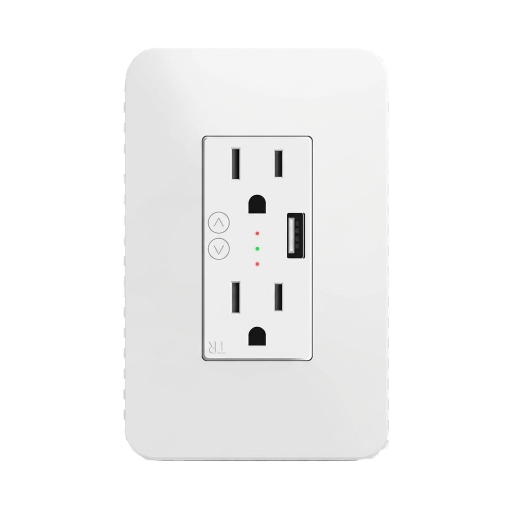 |
Notes
Product page
Examples
# configuration.yaml
# l1 and l2 come back on after 3 seconds countdown in home assistant (done on device)
# This is useful if you want to bounce a server or router that may disrupt your connection
# as it will come back on without z2m or ha if they are running on said server / router network
devices:
  '0x4444444444444444':
    friendly_name:  'My Wall Outlet'
    homeassistant:
      switch_l1:
        payload_off: '{"state_l1": "OFF", "countdown_l1": 3}'
        state_off: "OFF"
      switch_l2:
        payload_off: '{"state_l2": "OFF", "countdown_l2": 3}'
        state_off: "OFF"
      countdown_l1:
        type: sensor
      countdown_l2:
        type: sensor
      countdown_l3:
        type: sensor
Options
How to use device type specific configuration
time_start: Reply to Tuya-specific time synchronization requests: "1970" - Reply with seconds since 1970/01/01 (recommended, should stop the device from asking), "2000" - Reply with seconds since 2000/01/01 (use if the weekday is wrong with 1970), "off" - Don't reply (use if replying causes too much traffic). Default for this device: "off". The value must be one of1970,2000,offstate_action: State actions will also be published as 'action' when true (default false). The value must betrueorfalse
Exposes
Switch (l1 endpoint)
The current state of this switch is in the published state under the state_l1 property (value is ON or OFF). To control this switch publish a message to topic zigbee2mqtt/FRIENDLY_NAME/set with payload {"state_l1": "ON"}, {"state_l1": "OFF"} or {"state_l1": "TOGGLE"}. To read the current state of this switch publish a message to topic zigbee2mqtt/FRIENDLY_NAME/get with payload {"state_l1": ""}.
Switch (l2 endpoint)
The current state of this switch is in the published state under the state_l2 property (value is ON or OFF). To control this switch publish a message to topic zigbee2mqtt/FRIENDLY_NAME/set with payload {"state_l2": "ON"}, {"state_l2": "OFF"} or {"state_l2": "TOGGLE"}. To read the current state of this switch publish a message to topic zigbee2mqtt/FRIENDLY_NAME/get with payload {"state_l2": ""}.
Switch (l3 endpoint)
The current state of this switch is in the published state under the state_l3 property (value is ON or OFF). To control this switch publish a message to topic zigbee2mqtt/FRIENDLY_NAME/set with payload {"state_l3": "ON"}, {"state_l3": "OFF"} or {"state_l3": "TOGGLE"}. To read the current state of this switch publish a message to topic zigbee2mqtt/FRIENDLY_NAME/get with payload {"state_l3": ""}.
Countdown (numeric, l1 endpoint)
Toggle the device after a set duration (one time action). Value can be found in the published state on the countdown_l1 property. To read (/get) the value publish a message to topic zigbee2mqtt/FRIENDLY_NAME/get with payload {"countdown_l1": ""}. To write (/set) a value publish a message to topic zigbee2mqtt/FRIENDLY_NAME/set with payload {"countdown_l1": NEW_VALUE}. The minimal value is 0 and the maximum value is 43200. The unit of this value is s.
Countdown (numeric, l2 endpoint)
Toggle the device after a set duration (one time action). Value can be found in the published state on the countdown_l2 property. To read (/get) the value publish a message to topic zigbee2mqtt/FRIENDLY_NAME/get with payload {"countdown_l2": ""}. To write (/set) a value publish a message to topic zigbee2mqtt/FRIENDLY_NAME/set with payload {"countdown_l2": NEW_VALUE}. The minimal value is 0 and the maximum value is 43200. The unit of this value is s.
Countdown (numeric, l3 endpoint)
Toggle the device after a set duration (one time action). Value can be found in the published state on the countdown_l3 property. To read (/get) the value publish a message to topic zigbee2mqtt/FRIENDLY_NAME/get with payload {"countdown_l3": ""}. To write (/set) a value publish a message to topic zigbee2mqtt/FRIENDLY_NAME/set with payload {"countdown_l3": NEW_VALUE}. The minimal value is 0 and the maximum value is 43200. The unit of this value is s.
Power outage memory (enum)
Recover state after power outage. Value can be found in the published state on the power_outage_memory property. To read (/get) the value publish a message to topic zigbee2mqtt/FRIENDLY_NAME/get with payload {"power_outage_memory": ""}. To write (/set) a value publish a message to topic zigbee2mqtt/FRIENDLY_NAME/set with payload {"power_outage_memory": NEW_VALUE}. The possible values are: on, off, restore.
Child lock (binary)
Enables/disables physical input on the device. Value can be found in the published state on the child_lock property. It's not possible to read (/get) this value. To write (/set) a value publish a message to topic zigbee2mqtt/FRIENDLY_NAME/set with payload {"child_lock": NEW_VALUE}. If value equals LOCK child lock is ON, if UNLOCK OFF.