
Heiwa HPZERAD-V1
| Model | HPZERAD-V1 |
| Vendor | Heiwa |
| Description | Ernest thermostat (OEM Eurevia) |
| Exposes | climate (current_heating_setpoint, local_temperature), display_temperature, temperature_offset, humidity, humidity_offset, co2, co2_offset, display_brightness, language, temperature_unit, humidity_display, co2_display, display_temperature_source, setpoint_only_ui, setpoint_central, setpoint_minimum, setpoint_maximum, setpoint_step, room_name, profile, active_profile, remote_power, zone_demand_icon, battery, battery_voltage, refresh |
| Picture | 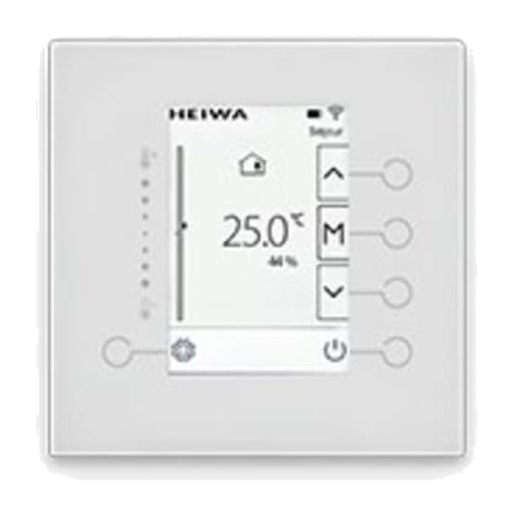 |
Options
How to use device type specific configuration
humidity_calibration: Calibrates the humidity value (absolute offset), takes into effect on next report of device. The value must be a number.humidity_precision: Number of digits after decimal point for humidity, takes into effect on next report of device. This option can only decrease the precision, not increase it. The value must be a number with a minimum value of0and with a maximum value of3co2_calibration: Calibrates the co2 value (absolute offset), takes into effect on next report of device. The value must be a number.
Exposes
Climate
This climate device supports the following features: current_heating_setpoint, local_temperature.
current_heating_setpoint: Temperature setpoint. To control publish a message to topiczigbee2mqtt/FRIENDLY_NAME/setwith payload{"current_heating_setpoint": VALUE}whereVALUEis the °C between18and27. To read send a message tozigbee2mqtt/FRIENDLY_NAME/getwith payload{"current_heating_setpoint": ""}.local_temperature: Current temperature measured on the device (in °C). To read send a message tozigbee2mqtt/FRIENDLY_NAME/getwith payload{"local_temperature": ""}.
Display temperature (numeric)
Temperature used by the stock display. Value can be found in the published state on the display_temperature property. It's not possible to read (/get) or write (/set) this value. The unit of this value is °C.
Temperature offset (numeric)
Temperature sensor offset. Value can be found in the published state on the temperature_offset property. To read (/get) the value publish a message to topic zigbee2mqtt/FRIENDLY_NAME/get with payload {"temperature_offset": ""}. To write (/set) a value publish a message to topic zigbee2mqtt/FRIENDLY_NAME/set with payload {"temperature_offset": NEW_VALUE}. The minimal value is -5 and the maximum value is 5. The unit of this value is °C.
Humidity (numeric)
Measured relative humidity. Value can be found in the published state on the humidity property. It's not possible to read (/get) or write (/set) this value. The unit of this value is %.
Humidity offset (numeric)
Humidity sensor offset. Value can be found in the published state on the humidity_offset property. To read (/get) the value publish a message to topic zigbee2mqtt/FRIENDLY_NAME/get with payload {"humidity_offset": ""}. To write (/set) a value publish a message to topic zigbee2mqtt/FRIENDLY_NAME/set with payload {"humidity_offset": NEW_VALUE}. The minimal value is -20 and the maximum value is 20. The unit of this value is %.
Co2 (numeric)
Remains zero on variants without a CO2 sensor. Value can be found in the published state on the co2 property. It's not possible to read (/get) or write (/set) this value. The unit of this value is ppm.
Co2 offset (numeric)
CO2 sensor offset. Value can be found in the published state on the co2_offset property. To read (/get) the value publish a message to topic zigbee2mqtt/FRIENDLY_NAME/get with payload {"co2_offset": ""}. To write (/set) a value publish a message to topic zigbee2mqtt/FRIENDLY_NAME/set with payload {"co2_offset": NEW_VALUE}. The minimal value is -1000 and the maximum value is 1000. The unit of this value is ppm.
Display brightness (numeric)
Stock display brightness. Value can be found in the published state on the display_brightness property. To read (/get) the value publish a message to topic zigbee2mqtt/FRIENDLY_NAME/get with payload {"display_brightness": ""}. To write (/set) a value publish a message to topic zigbee2mqtt/FRIENDLY_NAME/set with payload {"display_brightness": NEW_VALUE}. The minimal value is 0 and the maximum value is 10.
Language (enum)
Language used by the stock display. Value can be found in the published state on the language property. To read (/get) the value publish a message to topic zigbee2mqtt/FRIENDLY_NAME/get with payload {"language": ""}. To write (/set) a value publish a message to topic zigbee2mqtt/FRIENDLY_NAME/set with payload {"language": NEW_VALUE}. The possible values are: french, english.
Temperature unit (enum)
Temperature unit used by the stock display. Value can be found in the published state on the temperature_unit property. To read (/get) the value publish a message to topic zigbee2mqtt/FRIENDLY_NAME/get with payload {"temperature_unit": ""}. To write (/set) a value publish a message to topic zigbee2mqtt/FRIENDLY_NAME/set with payload {"temperature_unit": NEW_VALUE}. The possible values are: celsius, fahrenheit.
Humidity display (enum)
Whether humidity is shown on the stock display. Value can be found in the published state on the humidity_display property. To read (/get) the value publish a message to topic zigbee2mqtt/FRIENDLY_NAME/get with payload {"humidity_display": ""}. To write (/set) a value publish a message to topic zigbee2mqtt/FRIENDLY_NAME/set with payload {"humidity_display": NEW_VALUE}. The possible values are: hidden, shown.
Co2 display (enum)
Whether CO2 is shown on the stock display. Value can be found in the published state on the co2_display property. To read (/get) the value publish a message to topic zigbee2mqtt/FRIENDLY_NAME/get with payload {"co2_display": ""}. To write (/set) a value publish a message to topic zigbee2mqtt/FRIENDLY_NAME/set with payload {"co2_display": NEW_VALUE}. The possible values are: hidden, shown.
Display temperature source (enum)
Temperature source used by the stock display. Value can be found in the published state on the display_temperature_source property. To read (/get) the value publish a message to topic zigbee2mqtt/FRIENDLY_NAME/get with payload {"display_temperature_source": ""}. To write (/set) a value publish a message to topic zigbee2mqtt/FRIENDLY_NAME/set with payload {"display_temperature_source": NEW_VALUE}. The possible values are: temperature_1, temperature_2.
Setpoint only ui (binary)
Hide the local M/profile menu while keeping the setpoint arrows. Value can be found in the published state on the setpoint_only_ui property. To read (/get) the value publish a message to topic zigbee2mqtt/FRIENDLY_NAME/get with payload {"setpoint_only_ui": ""}. To write (/set) a value publish a message to topic zigbee2mqtt/FRIENDLY_NAME/set with payload {"setpoint_only_ui": NEW_VALUE}. If value equals ON setpoint only ui is ON, if OFF OFF.
Setpoint central (numeric)
Central setpoint. Value can be found in the published state on the setpoint_central property. To read (/get) the value publish a message to topic zigbee2mqtt/FRIENDLY_NAME/get with payload {"setpoint_central": ""}. To write (/set) a value publish a message to topic zigbee2mqtt/FRIENDLY_NAME/set with payload {"setpoint_central": NEW_VALUE}. The minimal value is 18 and the maximum value is 27. The unit of this value is °C.
Setpoint minimum (numeric)
Minimum local setpoint. Value can be found in the published state on the setpoint_minimum property. To read (/get) the value publish a message to topic zigbee2mqtt/FRIENDLY_NAME/get with payload {"setpoint_minimum": ""}. To write (/set) a value publish a message to topic zigbee2mqtt/FRIENDLY_NAME/set with payload {"setpoint_minimum": NEW_VALUE}. The minimal value is 18 and the maximum value is 27. The unit of this value is °C.
Setpoint maximum (numeric)
Maximum local setpoint. Value can be found in the published state on the setpoint_maximum property. To read (/get) the value publish a message to topic zigbee2mqtt/FRIENDLY_NAME/get with payload {"setpoint_maximum": ""}. To write (/set) a value publish a message to topic zigbee2mqtt/FRIENDLY_NAME/set with payload {"setpoint_maximum": NEW_VALUE}. The minimal value is 18 and the maximum value is 27. The unit of this value is °C.
Setpoint step (numeric)
Local setpoint increment. Value can be found in the published state on the setpoint_step property. To read (/get) the value publish a message to topic zigbee2mqtt/FRIENDLY_NAME/get with payload {"setpoint_step": ""}. To write (/set) a value publish a message to topic zigbee2mqtt/FRIENDLY_NAME/set with payload {"setpoint_step": NEW_VALUE}. The minimal value is 0.5 and the maximum value is 1. The unit of this value is °C.
Room name (text)
Room name shown by the stock UI; maximum 16 characters. Value can be found in the published state on the room_name property. To read (/get) the value publish a message to topic zigbee2mqtt/FRIENDLY_NAME/get with payload {"room_name": ""}. To write (/set) a value publish a message to topic zigbee2mqtt/FRIENDLY_NAME/set with payload {"room_name": NEW_VALUE}.
Profile (enum)
Request a stock thermostat profile. Value can be found in the published state on the profile property. To read (/get) the value publish a message to topic zigbee2mqtt/FRIENDLY_NAME/get with payload {"profile": ""}. To write (/set) a value publish a message to topic zigbee2mqtt/FRIENDLY_NAME/set with payload {"profile": NEW_VALUE}. The possible values are: off, eco, reduced, comfort.
Active profile (enum)
Stock thermostat profile currently active. Value can be found in the published state on the active_profile property. It's not possible to read (/get) or write (/set) this value. The possible values are: off, eco, reduced, comfort.
Remote power (binary)
Value can be found in the published state on the remote_power property. It's not possible to read (/get) or write (/set) this value. If value equals ON remote power is ON, if OFF OFF.
Zone demand icon (enum)
Value can be found in the published state on the zone_demand_icon property. To read (/get) the value publish a message to topic zigbee2mqtt/FRIENDLY_NAME/get with payload {"zone_demand_icon": ""}. To write (/set) a value publish a message to topic zigbee2mqtt/FRIENDLY_NAME/set with payload {"zone_demand_icon": NEW_VALUE}. The possible values are: none, heating, cooling.
Battery (numeric)
Estimated remaining battery percentage. Value can be found in the published state on the battery property. It's not possible to read (/get) or write (/set) this value. The minimal value is 0 and the maximum value is 100. The unit of this value is %.
Battery voltage (numeric)
Reported battery voltage. Value can be found in the published state on the battery_voltage property. To read (/get) the value publish a message to topic zigbee2mqtt/FRIENDLY_NAME/get with payload {"battery_voltage": ""}. It's not possible to write (/set) this value. The unit of this value is V.
Refresh (enum)
Value will not be published in the state. It's not possible to read (/get) this value. To write (/set) a value publish a message to topic zigbee2mqtt/FRIENDLY_NAME/set with payload {"refresh": NEW_VALUE}. The possible values are: press.