Zigbee2MQTTZigbee2MQTT
  • Getting started
  • Supported Adapters
  • Supported Devices
  • Installation
  • Configuration
  • Usage
  • FAQ
Devices
  • Zigbee

    • Zigbee network
    • Improve network range and stability
    • Secure your Zigbee network
    • Sniff Zigbee traffic
    • Create a CC2530 router
  • Support new devices

    • Support new devices
    • Support new Tuya devices
    • Find Tuya Data Points
  • Remote Adapter

    • Connect to a remote adapter
    • Connect to a remote Sonoff ZBBridge
  • More

    • 3D cases
    • External converters
    • External extensions
    • Switch to the dev branch
    • Get Tuya and Xiaomi OTA url
  • Forum
  • Discord
  • Issues
  • Donate
GitHub
GitHub (docs)
  • Getting started
  • Supported Adapters
  • Supported Devices
  • Installation
  • Configuration
  • Usage
  • FAQ
Devices
  • Zigbee

    • Zigbee network
    • Improve network range and stability
    • Secure your Zigbee network
    • Sniff Zigbee traffic
    • Create a CC2530 router
  • Support new devices

    • Support new devices
    • Support new Tuya devices
    • Find Tuya Data Points
  • Remote Adapter

    • Connect to a remote adapter
    • Connect to a remote Sonoff ZBBridge
  • More

    • 3D cases
    • External converters
    • External extensions
    • Switch to the dev branch
    • Get Tuya and Xiaomi OTA url
  • Forum
  • Discord
  • Issues
  • Donate
GitHub
GitHub (docs)

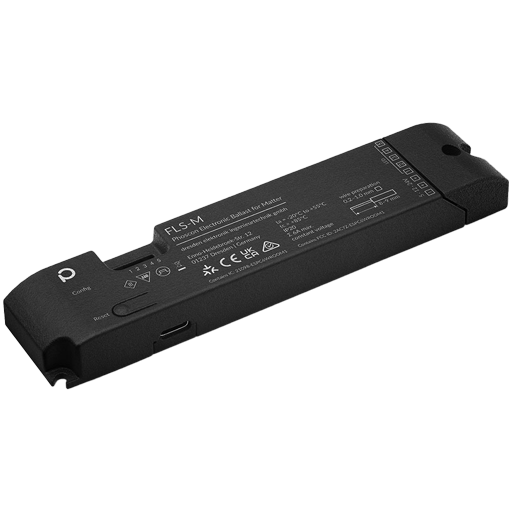
Dresden Elektronik FLS-M

ModelFLS-M
VendorDresden Elektronik
DescriptionUniversal LED controller (dynamic endpoints)
Exposes
PictureDresden Elektronik FLS-M

OTA updates

This device supports OTA updates, for more information see OTA updates.

Options

How to use device type specific configuration

  • transition: Controls the transition time (in seconds) of on/off, brightness, color temperature (if applicable) and color (if applicable) changes. Defaults to 0 (no transition). The value must be a number with a minimum value of 0

  • color_sync: When enabled colors will be synced, e.g. if the light supports both color x/y and color temperature a conversion from color x/y to color temperature will be done when setting the x/y color (default true). The value must be true or false

  • state_action: State actions will also be published as 'action' when true (default false). The value must be true or false

Exposes

Help to make the docu better and edit this page on Github ✌
Last Updated: 3/7/26, 5:43 AM