
EcoDim ED-10014
| Model | ED-10014 |
| Vendor | EcoDim |
| Description | Zigbee 8 button wall switch - white |
| Exposes | battery, action |
| Picture | 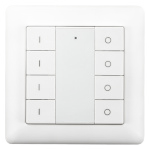 |
Pairing
Factory reset and disconnect from any other network
- Hold left upper and right upper button for approx. 5 seconds
- The LED turn on green
- Then press on any of those two buttons 5 times quickly.
Pairing with new network
- Bring Zigbee2MQTT into pairing mode.
- Hold left upper and right upper button for approx. 5 seconds
- When green light turns on press any of those 2 buttons one.
- The light should start flashing once per second.
- successful coupling is indicated by 5 quick flashes.
Group Errors
Symptom
In some situations, the switch stops working after other switches have joined or the switch beeing reconfigurated. You press a button and get an error in Z2M similar to:
"zh:ember: Failed to register group '32643' in multicast table with status=INVALID_STATE."
Reason
Those switches have the capability to build groups on their own and directly connect to ZigBee devices. If that happens it seems that they generate a random group number and pass this to Z2M when a button is pressed. Z2M doesnt know the group and raises the error.
Solution
Edit configuration.yaml of Z2M and add a group at the end of file. The file may have looked like:
groups: "0": friendly_name: Some Group
After getting the error, add a setting for the group. The changed section looks like:
groups: "0": friendly_name: Some Group "32643": friendly_name: EcoDim Switch 1 Group
Save the file and restart Z2M. If you now press the buttons, there must not be an error amymore.
Options
How to use device type specific configuration
simulated_brightness: Simulate a brightness value. If this device provides a brightness_move_up or brightness_move_down action it is possible to specify the update interval and delta. The action_brightness_delta indicates the delta for each interval. Example:
simulated_brightness:
  delta: 20 # delta per interval, default = 20
  interval: 200 # interval in milliseconds, default = 200
Exposes
Battery (numeric)
Remaining battery in %, can take up to 24 hours before reported. Value can be found in the published state on the battery property. It's not possible to read (/get) or write (/set) this value. The minimal value is 0 and the maximum value is 100. The unit of this value is %.
Action (enum)
Triggered action (e.g. a button click). Value can be found in the published state on the action property. It's not possible to read (/get) or write (/set) this value. The possible values are: on_1, off_1, brightness_move_up_1, brightness_move_down_1, brightness_stop_1, on_2, off_2, brightness_move_up_2, brightness_move_down_2, brightness_stop_2, on_3, off_3, brightness_move_up_3, brightness_move_down_3, brightness_stop_3, on_4, off_4, brightness_move_up_4, brightness_move_down_4, brightness_stop_4.