
Sengled E2D-G73
| Model | E2D-G73 |
| Vendor | Sengled |
| Description | Smart window and door sensor G2 |
| Exposes | contact, tamper, battery_low, battery, voltage |
| Picture | 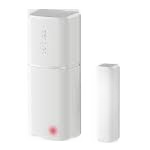 |
Notes
Pairing
Use a paperclip to press the reset button on the bottom of the device and hold it for four to eight seconds, then release it. The LED indicator light will flash twice in red to indicate the device is entering pairing mode. It will flash again when successfully paired.
OTA updates
This device supports OTA updates, for more information see OTA updates.
Exposes
Contact (binary)
Indicates whether the device is opened or closed. Value can be found in the published state on the contact property. It's not possible to read (/get) or write (/set) this value. If value equals false contact is ON, if true OFF.
Tamper (binary)
Indicates whether the device is tampered. Value can be found in the published state on the tamper property. It's not possible to read (/get) or write (/set) this value. If value equals true tamper is ON, if false OFF.
Battery low (binary)
Indicates whether the battery of the device is almost empty. Value can be found in the published state on the battery_low property. It's not possible to read (/get) or write (/set) this value. If value equals true battery low is ON, if false OFF.
Battery (numeric)
Remaining battery in %. Value can be found in the published state on the battery property. To read (/get) the value publish a message to topic zigbee2mqtt/FRIENDLY_NAME/get with payload {"battery": ""}. It's not possible to write (/set) this value. The minimal value is 0 and the maximum value is 100. The unit of this value is %.
Voltage (numeric)
Reported battery voltage in millivolts. Value can be found in the published state on the voltage property. To read (/get) the value publish a message to topic zigbee2mqtt/FRIENDLY_NAME/get with payload {"voltage": ""}. It's not possible to write (/set) this value. The unit of this value is mV.