
TERNCY DIM003
| Model | DIM003 |
| Vendor | TERNCY |
| Description | Color temperature dimmer |
| Exposes | rated_max_current_ma, startup_depth_calibration, color_temperature_range_min_kelvin, color_temperature_range_max_kelvin, color_temperature_io_reversed, light_up_curve, light (state, brightness, color_temp) |
| Picture | 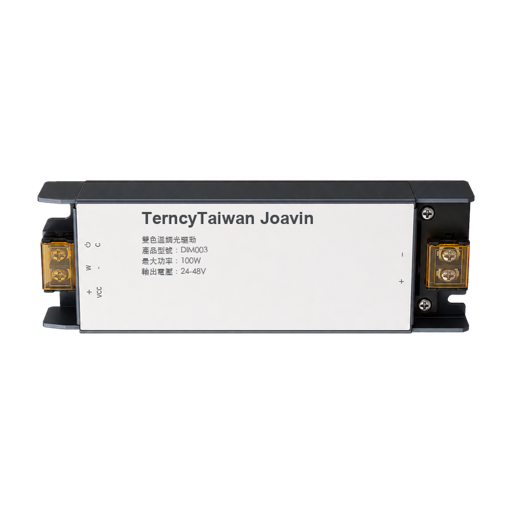 |
Options
How to use device type specific configuration
transition: Controls the transition time (in seconds) of on/off, brightness, color temperature (if applicable) and color (if applicable) changes. Defaults to0(no transition). The value must be a number with a minimum value of0color_sync: When enabled colors will be synced, e.g. if the light supports both color x/y and color temperature a conversion from color x/y to color temperature will be done when setting the x/y color (default true). The value must betrueorfalsestate_action: State actions will also be published as 'action' when true (default false). The value must betrueorfalse
Exposes
Rated max current ma (numeric)
Rated maximum current limit; setting may apply after a short delay. Value can be found in the published state on the rated_max_current_ma property. It's not possible to read (/get) this value. To write (/set) a value publish a message to topic zigbee2mqtt/FRIENDLY_NAME/set with payload {"rated_max_current_ma": NEW_VALUE}. The minimal value is 120 and the maximum value is 4950. The unit of this value is mA.
Startup depth calibration (numeric)
Xiaoyan startup depth calibration. Value can be found in the published state on the startup_depth_calibration property. It's not possible to read (/get) this value. To write (/set) a value publish a message to topic zigbee2mqtt/FRIENDLY_NAME/set with payload {"startup_depth_calibration": NEW_VALUE}. The minimal value is 0 and the maximum value is 5000.
Color temperature range min kelvin (numeric)
Warmest color temperature limit. Value can be found in the published state on the color_temperature_range_min_kelvin property. It's not possible to read (/get) this value. To write (/set) a value publish a message to topic zigbee2mqtt/FRIENDLY_NAME/set with payload {"color_temperature_range_min_kelvin": NEW_VALUE}. The minimal value is 1000 and the maximum value is 10000. The unit of this value is K.
Color temperature range max kelvin (numeric)
Coolest color temperature limit. Value can be found in the published state on the color_temperature_range_max_kelvin property. It's not possible to read (/get) this value. To write (/set) a value publish a message to topic zigbee2mqtt/FRIENDLY_NAME/set with payload {"color_temperature_range_max_kelvin": NEW_VALUE}. The minimal value is 1000 and the maximum value is 10000. The unit of this value is K.
Color temperature io reversed (binary)
Reverse the cool and warm white output IO mapping. Value can be found in the published state on the color_temperature_io_reversed property. It's not possible to read (/get) this value. To write (/set) a value publish a message to topic zigbee2mqtt/FRIENDLY_NAME/set with payload {"color_temperature_io_reversed": NEW_VALUE}. If value equals true color temperature io reversed is ON, if false OFF.
Light up curve (enum)
Light-up curve. Value can be found in the published state on the light_up_curve property. It's not possible to read (/get) this value. To write (/set) a value publish a message to topic zigbee2mqtt/FRIENDLY_NAME/set with payload {"light_up_curve": NEW_VALUE}. The possible values are: fast_start, uniform, slow_start.
Light
This light supports the following features: state, brightness, color_temp.
state: To control the state publish a message to topiczigbee2mqtt/FRIENDLY_NAME/setwith payload{"state": "ON"},{"state": "OFF"}or{"state": "TOGGLE"}. To read the state send a message tozigbee2mqtt/FRIENDLY_NAME/getwith payload{"state": ""}.brightness: To control the brightness publish a message to topiczigbee2mqtt/FRIENDLY_NAME/setwith payload{"brightness": VALUE}whereVALUEis a number between0and254. To read the brightness send a message tozigbee2mqtt/FRIENDLY_NAME/getwith payload{"brightness": ""}.color_temp: To control the color temperature (in reciprocal megakelvin a.k.a. mired scale) publish a message to topiczigbee2mqtt/FRIENDLY_NAME/setwith payload{"color_temp": VALUE}whereVALUEis a number between142and625, the higher the warmer the color. To read the color temperature send a message tozigbee2mqtt/FRIENDLY_NAME/getwith payload{"color_temp": ""}. Besides the numeric values the following values are accepted:coolest,cool,neutral,warm,warmest.
On with timed off
When setting the state to ON, it might be possible to specify an automatic shutoff after a certain amount of time. To do this add an additional property on_time to the payload which is the time in seconds the state should remain on. Additionally an off_wait_time property can be added to the payload to specify the cooldown time in seconds when the light will not answer to other on with timed off commands. Support depends on the light firmware. Some devices might require both on_time and off_wait_time to work Examples : {"state" : "ON", "on_time": 300}, {"state" : "ON", "on_time": 300, "off_wait_time": 120}.
Transition
For all of the above mentioned features it is possible to do a transition of the value over time. To do this add an additional property transition to the payload which is the transition time in seconds. Examples: {"brightness":156,"transition":3}, {"color_temp":241,"transition":1}.
Moving/stepping
Instead of setting a value (e.g. brightness) directly it is also possible to:
- move: this will automatically move the value over time, to stop send value
stopor0. - step: this will increment/decrement the current value by the given one.
The direction of move and step can be either up or down, provide a negative value to move/step down, a positive value to move/step up. To do this send a payload like below to zigbee2mqtt/FRIENDLY_NAME/set
NOTE: brightness move/step will stop at the minimum brightness and won't turn on the light when it's off. In this case use brightness_move_onoff/brightness_step_onoff
{
  "brightness_move": -40, // Starts moving brightness down at 40 units per second
  "brightness_move": 0, // Stop moving brightness
  "brightness_step": 40 // Increases brightness by 40
  "color_temp_move": 60, // Starts moving color temperature up at 60 units per second
  "color_temp_move": -40, // Starts moving color temperature down at 40 units per second
  "color_temp_move": "stop", // Stop moving color temperature
  "color_temp_move": "release", // Stop moving color temperature
  "color_temp_move": 0, // Stop moving color temperature
  "color_temp_move": "up", // Move to warmer color temperature at default rate
  "color_temp_move": 1, // Move to warmer color temperature at default rate
  "color_temp_move": "down", // Move to cooler color temperature at default rate
  "color_temp_move": {"rate": 30, "minimum": 150, "maximum": 500}, // Move with custom rate and constraints
  "color_temp_step": 99, // Increase color temperature by 99
}