
Bosch BSEN-C2D
| Model | BSEN-C2D |
| Vendor | Bosch |
| Description | Door/window contact II [+M] |
| Exposes | contact, break_function_enabled, break_function_timeout, break_function_state, battery, battery_low, action |
| Picture | 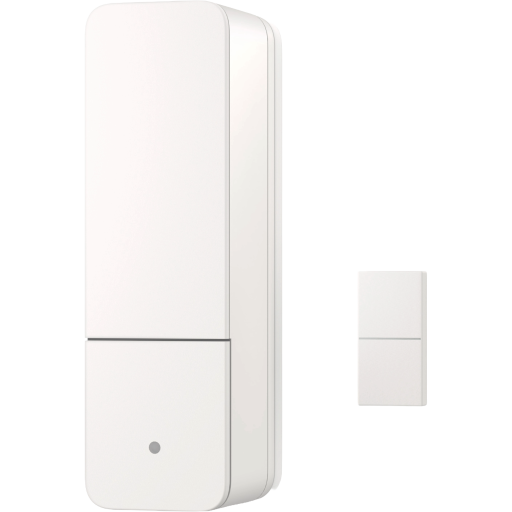 |
Notes
Important: Install Code Required
This device uses Zigbee 3.0 security and will not pair via the standard "Permit join" button. You must first add a specific Install Code to your Zigbee2MQTT configuration.
Note regarding the QR Code: The QR code printed on the device is formatted for the Matter standard and is not compatible with Zigbee2MQTT. Do not scan the QR code, as it will yield incorrect data. You must construct the Zigbee Install Code manually using the text printed on the device label.
How to generate the code: You need to combine 4 elements into a single long string (without spaces or hyphens):
Pattern: [Bosch Prefix] + [IEEE Address] + DLK + [Code from label]
- Bosch Prefix (Fixed): Copy this exact string (it is identical for all devices in this series):
RB01SG0D83101826480080000000000000000000 - IEEE Address (MAC): Find the 16-character code on the device sticker (often labeled MAC or IEEE). Type it as a continuous string, removing any colons.
- Marker: Simply type the letters:
DLK - Install Code: Find the alphanumeric string printed next to the QR code. Type it as a continuous string, removing any hyphens or spaces.
Construction Example:
- Prefix:
RB01SG0D83101826480080000000000000000000 - Your MAC:
18FC2600000A1B2C - Marker:
DLK - Your Code:
00112233445566778899AABBCCDDEEFF1234
Final string to paste (example): RB01SG0D8310182648008000000000000000000018FC2600000A1B2CDLK00112233445566778899AABBCCDDEEFF1234
How to apply in Zigbee2MQTT:
- Go to Settings -> Tools.
- Click Add install code.
- Ensure permit joining is active.
- Paste the long string generated above and click OK.
- Only after adding the code, put the sensor into pairing mode (press and hold the button for approx. 5 seconds until the LED flashes orange). The device should now pair automatically.
Exposes
Contact (binary)
Indicates whether the device is opened or closed. Value can be found in the published state on the contact property. It's not possible to read (/get) or write (/set) this value. If value equals false contact is ON, if true OFF.
Break function (binary)
Activate the break function by pressing the operating button on the door/window contact twice. This means that the device temporarily stops reading the sensors.. Value can be found in the published state on the break_function_enabled property. To read (/get) the value publish a message to topic zigbee2mqtt/FRIENDLY_NAME/get with payload {"break_function_enabled": ""}. To write (/set) a value publish a message to topic zigbee2mqtt/FRIENDLY_NAME/set with payload {"break_function_enabled": NEW_VALUE}. If value equals ON break function is ON, if OFF OFF.
Automatic time limit for breaks (numeric)
Here you can define how long the break function is activated for the door/window contact. Once the time limit has expired, the break ends automatically. The LED on the device will flash orange as long as the break is activated when this setting is being used.. Value can be found in the published state on the break_function_timeout property. To read (/get) the value publish a message to topic zigbee2mqtt/FRIENDLY_NAME/get with payload {"break_function_timeout": ""}. To write (/set) a value publish a message to topic zigbee2mqtt/FRIENDLY_NAME/set with payload {"break_function_timeout": NEW_VALUE}. The minimal value is 1 and the maximum value is 15. The unit of this value is minutes. Besides the numeric values the following values are accepted: disable.
Break function state (enum)
Indicates whether the device is in break mode or not. Value can be found in the published state on the break_function_state property. To read (/get) the value publish a message to topic zigbee2mqtt/FRIENDLY_NAME/get with payload {"break_function_state": ""}. It's not possible to write (/set) this value. The possible values are: break_active, idle.
Battery (numeric)
Remaining battery in %. Value can be found in the published state on the battery property. To read (/get) the value publish a message to topic zigbee2mqtt/FRIENDLY_NAME/get with payload {"battery": ""}. It's not possible to write (/set) this value. The minimal value is 0 and the maximum value is 100. The unit of this value is %.
Battery low (binary)
Empty battery indicator. Value can be found in the published state on the battery_low property. It's not possible to read (/get) or write (/set) this value. If value equals true battery low is ON, if false OFF.
Action (enum)
Triggered action (e.g. a button click). Value can be found in the published state on the action property. It's not possible to read (/get) or write (/set) this value. The possible values are: double_press, long_press, single_press, none.