
Nous A11Z
| Model | A11Z |
| Vendor | Nous |
| Description | 3-channel power strip with total energy monitoring |
| Exposes | switch (state), countdown, power_on_behavior, switch_type_button, indicator_mode, child_lock, power, voltage, current, energy, identify |
| Picture | 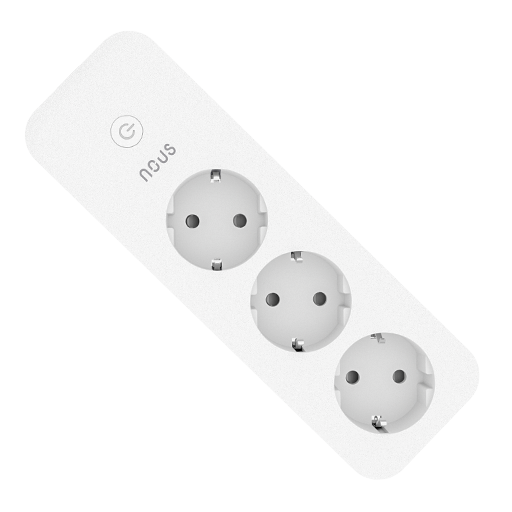 |
Notes
Pairing
Press and hold the button for 7s to put the device in pairing mode.
The main LED will flash until it connects.
Reset energy
To reset Sum of consumed energy, use the Dev console and execute:
Endpoint: 1, Cluster: 0 (genBasic), Command: 0 (resetFactDefault), Payload: empty
Next time the plug reports attributes, Sum of consumed energy will start from zero again.
Reset Child lock
Quickly press the physical button 4 times to reset Child Lock without Z2M.
Reporting
Configurable reporting works.
- Each energy attribute is reported as often as configured
- However, it automatically reports all energy attributes every 5 mins, in addition to the configured interval
- Null values have a 10 second delay in Z2M to rule out invalid measurements
Firmware
- Device comes with appVersion
82(reported as v1.1.2 in Tuya app). - Subscribed to manufacturerCode
4417, imageType54179
Options
How to use device type specific configuration
time_start: Reply to Tuya-specific time synchronization requests: "1970" - Reply with seconds since 1970/01/01 (recommended, should stop the device from asking), "2000" - Reply with seconds since 2000/01/01 (use if the weekday is wrong with 1970), "off" - Don't reply (use if replying causes too much traffic). Default for this device: "off". The value must be one of1970,2000,offpower_calibration: Calibrates the power value (percentual offset), takes into effect on next report of device. The value must be a number.power_precision: Number of digits after decimal point for power, takes into effect on next report of device. This option can only decrease the precision, not increase it. The value must be a number with a minimum value of0and with a maximum value of3voltage_calibration: Calibrates the voltage value (percentual offset), takes into effect on next report of device. The value must be a number.voltage_precision: Number of digits after decimal point for voltage, takes into effect on next report of device. This option can only decrease the precision, not increase it. The value must be a number with a minimum value of0and with a maximum value of3current_calibration: Calibrates the current value (percentual offset), takes into effect on next report of device. The value must be a number.current_precision: Number of digits after decimal point for current, takes into effect on next report of device. This option can only decrease the precision, not increase it. The value must be a number with a minimum value of0and with a maximum value of3energy_calibration: Calibrates the energy value (percentual offset), takes into effect on next report of device. The value must be a number.energy_precision: Number of digits after decimal point for energy, takes into effect on next report of device. This option can only decrease the precision, not increase it. The value must be a number with a minimum value of0and with a maximum value of3identify_timeout: Sets the duration of the identification procedure in seconds (i.e., how long the device would flash).The value ranges from 1 to 30 seconds (default: 3). The value must be a number with a minimum value of1and with a maximum value of30state_action: State actions will also be published as 'action' when true (default false). The value must betrueorfalse
Exposes
Switch (l1 endpoint)
The current state of this switch is in the published state under the state_l1 property (value is ON or OFF). To control this switch publish a message to topic zigbee2mqtt/FRIENDLY_NAME/set with payload {"state_l1": "ON"}, {"state_l1": "OFF"} or {"state_l1": "TOGGLE"}. To read the current state of this switch publish a message to topic zigbee2mqtt/FRIENDLY_NAME/get with payload {"state_l1": ""}.
Switch (l2 endpoint)
The current state of this switch is in the published state under the state_l2 property (value is ON or OFF). To control this switch publish a message to topic zigbee2mqtt/FRIENDLY_NAME/set with payload {"state_l2": "ON"}, {"state_l2": "OFF"} or {"state_l2": "TOGGLE"}. To read the current state of this switch publish a message to topic zigbee2mqtt/FRIENDLY_NAME/get with payload {"state_l2": ""}.
Switch (l3 endpoint)
The current state of this switch is in the published state under the state_l3 property (value is ON or OFF). To control this switch publish a message to topic zigbee2mqtt/FRIENDLY_NAME/set with payload {"state_l3": "ON"}, {"state_l3": "OFF"} or {"state_l3": "TOGGLE"}. To read the current state of this switch publish a message to topic zigbee2mqtt/FRIENDLY_NAME/get with payload {"state_l3": ""}.
Countdown (numeric, l1 endpoint)
Toggle the device after a set duration (one time action). Value can be found in the published state on the countdown_l1 property. To read (/get) the value publish a message to topic zigbee2mqtt/FRIENDLY_NAME/get with payload {"countdown_l1": ""}. To write (/set) a value publish a message to topic zigbee2mqtt/FRIENDLY_NAME/set with payload {"countdown_l1": NEW_VALUE}. The minimal value is 0 and the maximum value is 43200. The unit of this value is s.
Countdown (numeric, l2 endpoint)
Toggle the device after a set duration (one time action). Value can be found in the published state on the countdown_l2 property. To read (/get) the value publish a message to topic zigbee2mqtt/FRIENDLY_NAME/get with payload {"countdown_l2": ""}. To write (/set) a value publish a message to topic zigbee2mqtt/FRIENDLY_NAME/set with payload {"countdown_l2": NEW_VALUE}. The minimal value is 0 and the maximum value is 43200. The unit of this value is s.
Countdown (numeric, l3 endpoint)
Toggle the device after a set duration (one time action). Value can be found in the published state on the countdown_l3 property. To read (/get) the value publish a message to topic zigbee2mqtt/FRIENDLY_NAME/get with payload {"countdown_l3": ""}. To write (/set) a value publish a message to topic zigbee2mqtt/FRIENDLY_NAME/set with payload {"countdown_l3": NEW_VALUE}. The minimal value is 0 and the maximum value is 43200. The unit of this value is s.
Power-on behavior (enum, l1 endpoint)
Controls the behavior when the device is powered on after power loss. Value can be found in the published state on the power_on_behavior_l1 property. To read (/get) the value publish a message to topic zigbee2mqtt/FRIENDLY_NAME/get with payload {"power_on_behavior_l1": ""}. To write (/set) a value publish a message to topic zigbee2mqtt/FRIENDLY_NAME/set with payload {"power_on_behavior_l1": NEW_VALUE}. The possible values are: off, previous, on.
Power-on behavior (enum, l2 endpoint)
Controls the behavior when the device is powered on after power loss. Value can be found in the published state on the power_on_behavior_l2 property. To read (/get) the value publish a message to topic zigbee2mqtt/FRIENDLY_NAME/get with payload {"power_on_behavior_l2": ""}. To write (/set) a value publish a message to topic zigbee2mqtt/FRIENDLY_NAME/set with payload {"power_on_behavior_l2": NEW_VALUE}. The possible values are: off, previous, on.
Power-on behavior (enum, l3 endpoint)
Controls the behavior when the device is powered on after power loss. Value can be found in the published state on the power_on_behavior_l3 property. To read (/get) the value publish a message to topic zigbee2mqtt/FRIENDLY_NAME/get with payload {"power_on_behavior_l3": ""}. To write (/set) a value publish a message to topic zigbee2mqtt/FRIENDLY_NAME/set with payload {"power_on_behavior_l3": NEW_VALUE}. The possible values are: off, previous, on.
Switch type button (enum)
Determines when the button actuates. Value can be found in the published state on the switch_type_button property. To read (/get) the value publish a message to topic zigbee2mqtt/FRIENDLY_NAME/get with payload {"switch_type_button": ""}. To write (/set) a value publish a message to topic zigbee2mqtt/FRIENDLY_NAME/set with payload {"switch_type_button": NEW_VALUE}. The possible values are: release, press.
Indicator mode (enum)
LED indicator mode. Value can be found in the published state on the indicator_mode property. To read (/get) the value publish a message to topic zigbee2mqtt/FRIENDLY_NAME/get with payload {"indicator_mode": ""}. To write (/set) a value publish a message to topic zigbee2mqtt/FRIENDLY_NAME/set with payload {"indicator_mode": NEW_VALUE}. The possible values are: off, off/on, on/off, on.
Child lock (binary)
Enables/disables physical input on the device. Value can be found in the published state on the child_lock property. It's not possible to read (/get) this value. To write (/set) a value publish a message to topic zigbee2mqtt/FRIENDLY_NAME/set with payload {"child_lock": NEW_VALUE}. If value equals LOCK child lock is ON, if UNLOCK OFF.
Power (numeric)
Instantaneous measured power. Value can be found in the published state on the power property. To read (/get) the value publish a message to topic zigbee2mqtt/FRIENDLY_NAME/get with payload {"power": ""}. It's not possible to write (/set) this value. The unit of this value is W.
Voltage (numeric)
Measured electrical potential value. Value can be found in the published state on the voltage property. To read (/get) the value publish a message to topic zigbee2mqtt/FRIENDLY_NAME/get with payload {"voltage": ""}. It's not possible to write (/set) this value. The unit of this value is V.
Current (numeric)
Instantaneous measured electrical current. Value can be found in the published state on the current property. To read (/get) the value publish a message to topic zigbee2mqtt/FRIENDLY_NAME/get with payload {"current": ""}. It's not possible to write (/set) this value. The unit of this value is A.
Energy (numeric)
Sum of consumed energy. Value can be found in the published state on the energy property. To read (/get) the value publish a message to topic zigbee2mqtt/FRIENDLY_NAME/get with payload {"energy": ""}. It's not possible to write (/set) this value. The unit of this value is kWh.
Identify (enum)
Initiate device identification. Value will not be published in the state. It's not possible to read (/get) this value. To write (/set) a value publish a message to topic zigbee2mqtt/FRIENDLY_NAME/set with payload {"identify": NEW_VALUE}. The possible values are: identify.