
Namron 4512795
| Model | 4512795 |
| Vendor | Namron |
| Description | Simplify thermostat |
| Exposes | climate (local_temperature, local_temperature_calibration, occupied_heating_setpoint, running_state, pi_heating_demand), switch (state), identify, humidity, power, voltage, current, energy, preset, fault, child_lock, system_lock, window_open_check, window_open, frost_protection, auto_time, adaptive_function, idle_screen, schedule, work_days, sensor_mode, schedule_snooze, control_mode, theme, floor_protection_type, floor_sensor_type, external_sensor_type, floor_sensor_brand, external_sensor_brand, floor_sensor_resistance, external_sensor_resistance, home_temperature, away_temperature, sleep_temperature, holiday_temperature, floor_temperature_limit, hysteresis, temperature_lower_limit, temperature_upper_limit, frost_protection_temperature, active_backlight, idle_backlight, screen_on_time, regulator_cycle, regulator_percentage, curing_time |
| Picture | 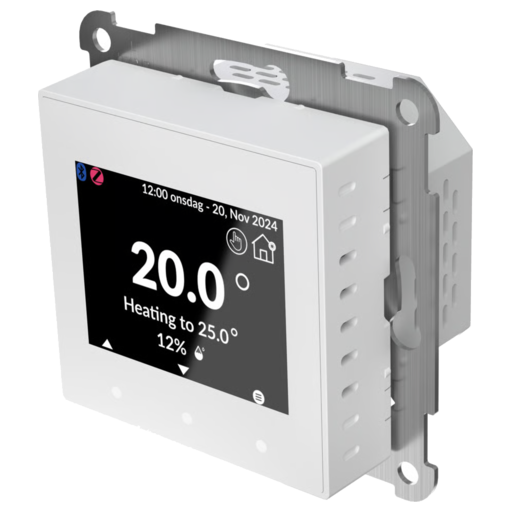 |
OTA updates
This device supports OTA updates, for more information see OTA updates.
Options
How to use device type specific configuration
humidity_calibration: Calibrates the humidity value (absolute offset), takes into effect on next report of device. The value must be a number.humidity_precision: Number of digits after decimal point for humidity, takes into effect on next report of device. This option can only decrease the precision, not increase it. The value must be a number with a minimum value of0and with a maximum value of3power_calibration: Calibrates the power value (percentual offset), takes into effect on next report of device. The value must be a number.power_precision: Number of digits after decimal point for power, takes into effect on next report of device. This option can only decrease the precision, not increase it. The value must be a number with a minimum value of0and with a maximum value of3voltage_calibration: Calibrates the voltage value (percentual offset), takes into effect on next report of device. The value must be a number.voltage_precision: Number of digits after decimal point for voltage, takes into effect on next report of device. This option can only decrease the precision, not increase it. The value must be a number with a minimum value of0and with a maximum value of3current_calibration: Calibrates the current value (percentual offset), takes into effect on next report of device. The value must be a number.current_precision: Number of digits after decimal point for current, takes into effect on next report of device. This option can only decrease the precision, not increase it. The value must be a number with a minimum value of0and with a maximum value of3energy_calibration: Calibrates the energy value (percentual offset), takes into effect on next report of device. The value must be a number.energy_precision: Number of digits after decimal point for energy, takes into effect on next report of device. This option can only decrease the precision, not increase it. The value must be a number with a minimum value of0and with a maximum value of3thermostat_unit: Controls the temperature unit of the thermostat (default celsius). The value must be one ofcelsius,fahrenheitidentify_timeout: Sets the duration of the identification procedure in seconds (i.e., how long the device would flash).The value ranges from 1 to 30 seconds (default: 3). The value must be a number with a minimum value of1and with a maximum value of30state_action: State actions will also be published as 'action' when true (default false). The value must betrueorfalse
Exposes
Climate
This climate device supports the following features: local_temperature, local_temperature_calibration, occupied_heating_setpoint, running_state, pi_heating_demand.
occupied_heating_setpoint: Temperature setpoint. To control publish a message to topiczigbee2mqtt/FRIENDLY_NAME/setwith payload{"occupied_heating_setpoint": VALUE}whereVALUEis the °C between5and40. To read send a message tozigbee2mqtt/FRIENDLY_NAME/getwith payload{"occupied_heating_setpoint": ""}.pi_heating_demand: Position of the valve (= demanded heat) where 0% is fully closed and 100% is fully open. Writing (/set) this attribute is not possible. Reading (/get) this attribute is not possible.local_temperature: Current temperature measured on the device (in °C). To read send a message tozigbee2mqtt/FRIENDLY_NAME/getwith payload{"local_temperature": ""}.running_state: The current running state. Possible values are:idle,heat. To read send a message tozigbee2mqtt/FRIENDLY_NAME/getwith payload{"running_state": ""}.local_temperature_calibration: Offset to add/subtract to the local temperature. To control publish a message to topiczigbee2mqtt/FRIENDLY_NAME/setwith payload{"local_temperature_calibration": VALUE}.To read send a message tozigbee2mqtt/FRIENDLY_NAME/getwith payload{"local_temperature": ""}.The minimal value is-10and the maximum value is10with a step size of0.5.
Switch
The current state of this switch is in the published state under the state property (value is ON or OFF). To control this switch publish a message to topic zigbee2mqtt/FRIENDLY_NAME/set with payload {"state": "ON"}, {"state": "OFF"} or {"state": "TOGGLE"}. To read the current state of this switch publish a message to topic zigbee2mqtt/FRIENDLY_NAME/get with payload {"state": ""}.
On with timed off
When setting the state to ON, it might be possible to specify an automatic shutoff after a certain amount of time. To do this add an additional property on_time to the payload which is the time in seconds the state should remain on. Additionally an off_wait_time property can be added to the payload to specify the cooldown time in seconds when the switch will not answer to other on with timed off commands. Support depends on the switch firmware. Some devices might require both on_time and off_wait_time to work Examples : {"state" : "ON", "on_time": 300}, {"state" : "ON", "on_time": 300, "off_wait_time": 120}.
Identify (enum)
Initiate device identification. Value will not be published in the state. It's not possible to read (/get) this value. To write (/set) a value publish a message to topic zigbee2mqtt/FRIENDLY_NAME/set with payload {"identify": "VALUE"}. The possible values are: identify.
Humidity (numeric)
Measured relative humidity. Value can be found in the published state on the humidity property. To read (/get) the value publish a message to topic zigbee2mqtt/FRIENDLY_NAME/get with payload {"humidity": ""}. It's not possible to write (/set) this value. The unit of this value is %.
Power (numeric)
Instantaneous measured power. Value can be found in the published state on the power property. To read (/get) the value publish a message to topic zigbee2mqtt/FRIENDLY_NAME/get with payload {"power": ""}. It's not possible to write (/set) this value. The unit of this value is W.
Voltage (numeric)
Measured electrical potential value. Value can be found in the published state on the voltage property. To read (/get) the value publish a message to topic zigbee2mqtt/FRIENDLY_NAME/get with payload {"voltage": ""}. It's not possible to write (/set) this value. The unit of this value is V.
Current (numeric)
Instantaneous measured electrical current. Value can be found in the published state on the current property. To read (/get) the value publish a message to topic zigbee2mqtt/FRIENDLY_NAME/get with payload {"current": ""}. It's not possible to write (/set) this value. The unit of this value is A.
Energy (numeric)
Sum of consumed energy. Value can be found in the published state on the energy property. To read (/get) the value publish a message to topic zigbee2mqtt/FRIENDLY_NAME/get with payload {"energy": ""}. It's not possible to write (/set) this value. The unit of this value is kWh.
Preset (enum)
Preset. Value can be found in the published state on the preset property. To read (/get) the value publish a message to topic zigbee2mqtt/FRIENDLY_NAME/get with payload {"preset": ""}. To write (/set) a value publish a message to topic zigbee2mqtt/FRIENDLY_NAME/set with payload {"preset": "VALUE"}. The possible values are: manual, home, away, sleep, holiday.
Fault (enum)
Error shown on the display (ERR1-ERR7). Value can be found in the published state on the fault property. To read (/get) the value publish a message to topic zigbee2mqtt/FRIENDLY_NAME/get with payload {"fault": ""}. It's not possible to write (/set) this value. The possible values are: none, zigbee_error, bluetooth_error, internal_sensor_error, floor_sensor_error, external_sensor_error, overheat, overload.
Child lock (binary)
Locks all buttons on the thermostat. Value can be found in the published state on the child_lock property. To read (/get) the value publish a message to topic zigbee2mqtt/FRIENDLY_NAME/get with payload {"child_lock": ""}. To write (/set) a value publish a message to topic zigbee2mqtt/FRIENDLY_NAME/set with payload {"child_lock": "VALUE"}. If value equals LOCK child lock is ON, if UNLOCK OFF.
System lock (binary)
Locks access to the settings menu, the setpoint can still be changed. Value can be found in the published state on the system_lock property. To read (/get) the value publish a message to topic zigbee2mqtt/FRIENDLY_NAME/get with payload {"system_lock": ""}. To write (/set) a value publish a message to topic zigbee2mqtt/FRIENDLY_NAME/set with payload {"system_lock": "VALUE"}. If value equals ON system lock is ON, if OFF OFF.
Window open check (binary)
Enable open window detection. Value can be found in the published state on the window_open_check property. To read (/get) the value publish a message to topic zigbee2mqtt/FRIENDLY_NAME/get with payload {"window_open_check": ""}. To write (/set) a value publish a message to topic zigbee2mqtt/FRIENDLY_NAME/set with payload {"window_open_check": "VALUE"}. If value equals ON window open check is ON, if OFF OFF.
Window open (binary)
Open window detected. Value can be found in the published state on the window_open property. To read (/get) the value publish a message to topic zigbee2mqtt/FRIENDLY_NAME/get with payload {"window_open": ""}. It's not possible to write (/set) this value. If value equals ON window open is ON, if OFF OFF.
Frost protection (binary)
Enable frost protection. Value can be found in the published state on the frost_protection property. To read (/get) the value publish a message to topic zigbee2mqtt/FRIENDLY_NAME/get with payload {"frost_protection": ""}. To write (/set) a value publish a message to topic zigbee2mqtt/FRIENDLY_NAME/set with payload {"frost_protection": "VALUE"}. If value equals ON frost protection is ON, if OFF OFF.
Auto time (binary)
Automatically set time. Value can be found in the published state on the auto_time property. To read (/get) the value publish a message to topic zigbee2mqtt/FRIENDLY_NAME/get with payload {"auto_time": ""}. To write (/set) a value publish a message to topic zigbee2mqtt/FRIENDLY_NAME/set with payload {"auto_time": "VALUE"}. If value equals ON auto time is ON, if OFF OFF.
Adaptive function (binary)
Adaptive heating. Value can be found in the published state on the adaptive_function property. To read (/get) the value publish a message to topic zigbee2mqtt/FRIENDLY_NAME/get with payload {"adaptive_function": ""}. To write (/set) a value publish a message to topic zigbee2mqtt/FRIENDLY_NAME/set with payload {"adaptive_function": "VALUE"}. If value equals ON adaptive function is ON, if OFF OFF.
Idle screen (binary)
Show idle screen. Value can be found in the published state on the idle_screen property. To read (/get) the value publish a message to topic zigbee2mqtt/FRIENDLY_NAME/get with payload {"idle_screen": ""}. To write (/set) a value publish a message to topic zigbee2mqtt/FRIENDLY_NAME/set with payload {"idle_screen": "VALUE"}. If value equals ON idle screen is ON, if OFF OFF.
Schedule (binary)
Enable week schedule. Value can be found in the published state on the schedule property. To read (/get) the value publish a message to topic zigbee2mqtt/FRIENDLY_NAME/get with payload {"schedule": ""}. To write (/set) a value publish a message to topic zigbee2mqtt/FRIENDLY_NAME/set with payload {"schedule": "VALUE"}. If value equals ON schedule is ON, if OFF OFF.
Work days (enum)
Work days used by the week schedule. Value can be found in the published state on the work_days property. To read (/get) the value publish a message to topic zigbee2mqtt/FRIENDLY_NAME/get with payload {"work_days": ""}. To write (/set) a value publish a message to topic zigbee2mqtt/FRIENDLY_NAME/set with payload {"work_days": "VALUE"}. The possible values are: 5+2, 6+1, 7+0, 0+7.
Sensor mode (enum)
Temperature sensor used for regulation. Value can be found in the published state on the sensor_mode property. To read (/get) the value publish a message to topic zigbee2mqtt/FRIENDLY_NAME/get with payload {"sensor_mode": ""}. To write (/set) a value publish a message to topic zigbee2mqtt/FRIENDLY_NAME/set with payload {"sensor_mode": "VALUE"}. The possible values are: air, floor, external.
Schedule snooze (enum)
Temporarily pause the week schedule. Value can be found in the published state on the schedule_snooze property. To read (/get) the value publish a message to topic zigbee2mqtt/FRIENDLY_NAME/get with payload {"schedule_snooze": ""}. To write (/set) a value publish a message to topic zigbee2mqtt/FRIENDLY_NAME/set with payload {"schedule_snooze": "VALUE"}. The possible values are: none, 3h, 6h, 12h, day, week.
Control mode (enum)
Thermostat or power regulator mode. Value can be found in the published state on the control_mode property. To read (/get) the value publish a message to topic zigbee2mqtt/FRIENDLY_NAME/get with payload {"control_mode": ""}. To write (/set) a value publish a message to topic zigbee2mqtt/FRIENDLY_NAME/set with payload {"control_mode": "VALUE"}. The possible values are: thermostat, power_regulator.
Theme (enum)
Display theme. Value can be found in the published state on the theme property. To read (/get) the value publish a message to topic zigbee2mqtt/FRIENDLY_NAME/get with payload {"theme": ""}. To write (/set) a value publish a message to topic zigbee2mqtt/FRIENDLY_NAME/set with payload {"theme": "VALUE"}. The possible values are: dark, light.
Floor protection type (enum)
Floor type, determines the floor temperature limit. Value can be found in the published state on the floor_protection_type property. To read (/get) the value publish a message to topic zigbee2mqtt/FRIENDLY_NAME/get with payload {"floor_protection_type": ""}. To write (/set) a value publish a message to topic zigbee2mqtt/FRIENDLY_NAME/set with payload {"floor_protection_type": "VALUE"}. The possible values are: none, wood, stone, custom, no_floor_sensor.
Floor sensor type (enum)
Type of floor sensor. Value can be found in the published state on the floor_sensor_type property. To read (/get) the value publish a message to topic zigbee2mqtt/FRIENDLY_NAME/get with payload {"floor_sensor_type": ""}. To write (/set) a value publish a message to topic zigbee2mqtt/FRIENDLY_NAME/set with payload {"floor_sensor_type": "VALUE"}. The possible values are: namron, other_brand, manual, no_sensor.
External sensor type (enum)
Type of external sensor. Value can be found in the published state on the external_sensor_type property. To read (/get) the value publish a message to topic zigbee2mqtt/FRIENDLY_NAME/get with payload {"external_sensor_type": ""}. To write (/set) a value publish a message to topic zigbee2mqtt/FRIENDLY_NAME/set with payload {"external_sensor_type": "VALUE"}. The possible values are: namron, other_brand, manual, no_sensor.
Floor sensor brand (enum)
Floor sensor brand (sensor type other_brand). Value can be found in the published state on the floor_sensor_brand property. To read (/get) the value publish a message to topic zigbee2mqtt/FRIENDLY_NAME/get with payload {"floor_sensor_brand": ""}. To write (/set) a value publish a message to topic zigbee2mqtt/FRIENDLY_NAME/set with payload {"floor_sensor_brand": "VALUE"}. The possible values are: ctm_47k, elko_10k, heatit_10k, micromatic_12k, sg_12k, schneider_10k.
External sensor brand (enum)
External sensor brand (sensor type other_brand). Value can be found in the published state on the external_sensor_brand property. To read (/get) the value publish a message to topic zigbee2mqtt/FRIENDLY_NAME/get with payload {"external_sensor_brand": ""}. To write (/set) a value publish a message to topic zigbee2mqtt/FRIENDLY_NAME/set with payload {"external_sensor_brand": "VALUE"}. The possible values are: ctm_47k, elko_10k, heatit_10k, micromatic_12k, sg_12k, schneider_10k.
Floor sensor resistance (enum)
Floor sensor resistance (sensor type manual). Value can be found in the published state on the floor_sensor_resistance property. To read (/get) the value publish a message to topic zigbee2mqtt/FRIENDLY_NAME/get with payload {"floor_sensor_resistance": ""}. To write (/set) a value publish a message to topic zigbee2mqtt/FRIENDLY_NAME/set with payload {"floor_sensor_resistance": "VALUE"}. The possible values are: 6.8k, 10k, 12k, 15k, 22k, 33k, 47k, 100k.
External sensor resistance (enum)
External sensor resistance (sensor type manual). Value can be found in the published state on the external_sensor_resistance property. To read (/get) the value publish a message to topic zigbee2mqtt/FRIENDLY_NAME/get with payload {"external_sensor_resistance": ""}. To write (/set) a value publish a message to topic zigbee2mqtt/FRIENDLY_NAME/set with payload {"external_sensor_resistance": "VALUE"}. The possible values are: 6.8k, 10k, 12k, 15k, 22k, 33k, 47k, 100k.
Home temperature (numeric)
Setpoint in home mode. Value can be found in the published state on the home_temperature property. To read (/get) the value publish a message to topic zigbee2mqtt/FRIENDLY_NAME/get with payload {"home_temperature": ""}. To write (/set) a value publish a message to topic zigbee2mqtt/FRIENDLY_NAME/set with payload {"home_temperature": VALUE}. The minimal value is 5 and the maximum value is 40. The unit of this value is °C.
Away temperature (numeric)
Setpoint in away mode. Value can be found in the published state on the away_temperature property. To read (/get) the value publish a message to topic zigbee2mqtt/FRIENDLY_NAME/get with payload {"away_temperature": ""}. To write (/set) a value publish a message to topic zigbee2mqtt/FRIENDLY_NAME/set with payload {"away_temperature": VALUE}. The minimal value is 5 and the maximum value is 40. The unit of this value is °C.
Sleep temperature (numeric)
Setpoint in sleep mode. Value can be found in the published state on the sleep_temperature property. To read (/get) the value publish a message to topic zigbee2mqtt/FRIENDLY_NAME/get with payload {"sleep_temperature": ""}. To write (/set) a value publish a message to topic zigbee2mqtt/FRIENDLY_NAME/set with payload {"sleep_temperature": VALUE}. The minimal value is 5 and the maximum value is 40. The unit of this value is °C.
Holiday temperature (numeric)
Setpoint in holiday mode. Value can be found in the published state on the holiday_temperature property. To read (/get) the value publish a message to topic zigbee2mqtt/FRIENDLY_NAME/get with payload {"holiday_temperature": ""}. To write (/set) a value publish a message to topic zigbee2mqtt/FRIENDLY_NAME/set with payload {"holiday_temperature": VALUE}. The minimal value is 5 and the maximum value is 40. The unit of this value is °C.
Floor temperature limit (numeric)
Maximum floor temperature (custom floor protection type). Value can be found in the published state on the floor_temperature_limit property. To read (/get) the value publish a message to topic zigbee2mqtt/FRIENDLY_NAME/get with payload {"floor_temperature_limit": ""}. To write (/set) a value publish a message to topic zigbee2mqtt/FRIENDLY_NAME/set with payload {"floor_temperature_limit": VALUE}. The minimal value is 25 and the maximum value is 40. The unit of this value is °C.
Hysteresis (numeric)
Hysteresis. Value can be found in the published state on the hysteresis property. To read (/get) the value publish a message to topic zigbee2mqtt/FRIENDLY_NAME/get with payload {"hysteresis": ""}. To write (/set) a value publish a message to topic zigbee2mqtt/FRIENDLY_NAME/set with payload {"hysteresis": VALUE}. The minimal value is 0.5 and the maximum value is 5. The unit of this value is °C.
Temperature lower limit (numeric)
Lowest setpoint that can be selected. Value can be found in the published state on the temperature_lower_limit property. To read (/get) the value publish a message to topic zigbee2mqtt/FRIENDLY_NAME/get with payload {"temperature_lower_limit": ""}. To write (/set) a value publish a message to topic zigbee2mqtt/FRIENDLY_NAME/set with payload {"temperature_lower_limit": VALUE}. The minimal value is 5 and the maximum value is 39.5. The unit of this value is °C.
Temperature upper limit (numeric)
Highest setpoint that can be selected. Value can be found in the published state on the temperature_upper_limit property. To read (/get) the value publish a message to topic zigbee2mqtt/FRIENDLY_NAME/get with payload {"temperature_upper_limit": ""}. To write (/set) a value publish a message to topic zigbee2mqtt/FRIENDLY_NAME/set with payload {"temperature_upper_limit": VALUE}. The minimal value is 5.5 and the maximum value is 40. The unit of this value is °C.
Frost protection temperature (numeric)
Frost protection setpoint. Value can be found in the published state on the frost_protection_temperature property. To read (/get) the value publish a message to topic zigbee2mqtt/FRIENDLY_NAME/get with payload {"frost_protection_temperature": ""}. To write (/set) a value publish a message to topic zigbee2mqtt/FRIENDLY_NAME/set with payload {"frost_protection_temperature": VALUE}. The minimal value is 5 and the maximum value is 10. The unit of this value is °C.
Active backlight (numeric)
Display brightness when active. Value can be found in the published state on the active_backlight property. To read (/get) the value publish a message to topic zigbee2mqtt/FRIENDLY_NAME/get with payload {"active_backlight": ""}. To write (/set) a value publish a message to topic zigbee2mqtt/FRIENDLY_NAME/set with payload {"active_backlight": VALUE}. The minimal value is 10 and the maximum value is 100. The unit of this value is %.
Idle backlight (numeric)
Display brightness when idle. Value can be found in the published state on the idle_backlight property. To read (/get) the value publish a message to topic zigbee2mqtt/FRIENDLY_NAME/get with payload {"idle_backlight": ""}. To write (/set) a value publish a message to topic zigbee2mqtt/FRIENDLY_NAME/set with payload {"idle_backlight": VALUE}. The minimal value is 10 and the maximum value is 100. The unit of this value is %.
Screen on time (numeric)
Screen timeout, 0 = always on. Value can be found in the published state on the screen_on_time property. To read (/get) the value publish a message to topic zigbee2mqtt/FRIENDLY_NAME/get with payload {"screen_on_time": ""}. To write (/set) a value publish a message to topic zigbee2mqtt/FRIENDLY_NAME/set with payload {"screen_on_time": VALUE}. The minimal value is 0 and the maximum value is 60. The unit of this value is s.
Regulator cycle (numeric)
Power regulator cycle duration. Value can be found in the published state on the regulator_cycle property. To read (/get) the value publish a message to topic zigbee2mqtt/FRIENDLY_NAME/get with payload {"regulator_cycle": ""}. To write (/set) a value publish a message to topic zigbee2mqtt/FRIENDLY_NAME/set with payload {"regulator_cycle": VALUE}. The minimal value is 1 and the maximum value is 30. The unit of this value is min.
Regulator percentage (numeric)
Heating level in power regulator mode. Value can be found in the published state on the regulator_percentage property. To read (/get) the value publish a message to topic zigbee2mqtt/FRIENDLY_NAME/get with payload {"regulator_percentage": ""}. To write (/set) a value publish a message to topic zigbee2mqtt/FRIENDLY_NAME/set with payload {"regulator_percentage": VALUE}. The minimal value is 10 and the maximum value is 100. The unit of this value is %.
Curing time (numeric)
Floor curing, heating is blocked while curing. Value can be found in the published state on the curing_time property. To read (/get) the value publish a message to topic zigbee2mqtt/FRIENDLY_NAME/get with payload {"curing_time": ""}. To write (/set) a value publish a message to topic zigbee2mqtt/FRIENDLY_NAME/set with payload {"curing_time": VALUE}. The minimal value is 0 and the maximum value is 40. The unit of this value is days.