
Tervix 119710
| Model | 119710 |
| Vendor | Tervix |
| Description | Pro Line Zigbee+RF wireless room thermostat |
| Exposes | climate (current_heating_setpoint, local_temperature, local_temperature_calibration, system_mode, running_state, preset), humidity, battery, child_lock, backlight, window_state, window_detection, frost_protection, comfort_temperature, eco_temperature, window_open_detection_time, window_open_detection_temperature, window_open_delay_time, boost_time, valve_init_opening, valve_opening, pid_p, pid_i, trv_count, quick_pair, display_reversed, humidity_control, humidity_setpoint, heat_times_today, heat_times_month, heat_times_total |
| Picture | 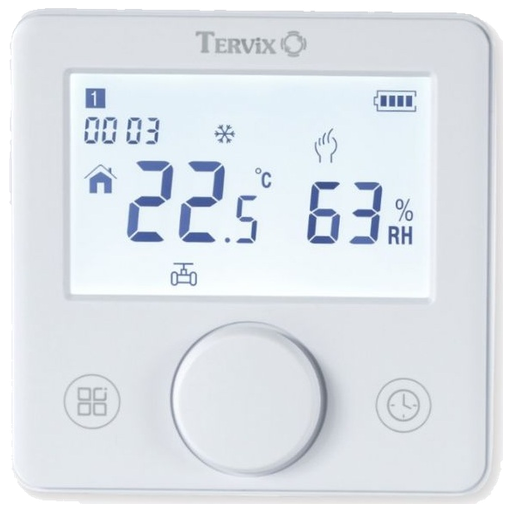 |
Options
How to use device type specific configuration
time_start: Reply to Tuya-specific time synchronization requests: "1970" - Reply with seconds since 1970/01/01 (recommended, should stop the device from asking), "2000" - Reply with seconds since 2000/01/01 (use if the weekday is wrong with 1970), "off" - Don't reply (use if replying causes too much traffic). Default for this device: "1970". The value must be one of1970,2000,offhumidity_calibration: Calibrates the humidity value (absolute offset), takes into effect on next report of device. The value must be a number.humidity_precision: Number of digits after decimal point for humidity, takes into effect on next report of device. This option can only decrease the precision, not increase it. The value must be a number with a minimum value of0and with a maximum value of3
Exposes
Climate
This climate device supports the following features: current_heating_setpoint, local_temperature, local_temperature_calibration, system_mode, running_state, preset.
current_heating_setpoint: Temperature setpoint. To control publish a message to topiczigbee2mqtt/FRIENDLY_NAME/setwith payload{"current_heating_setpoint": VALUE}whereVALUEis the °C between5and35. Reading (/get) this attribute is not possible.local_temperature: Current temperature measured on the device (in °C). Reading (/get) this attribute is not possible.system_mode: Mode of this device. To control publish a message to topiczigbee2mqtt/FRIENDLY_NAME/setwith payload{"system_mode": "VALUE"}whereVALUEis one of:off,heat. Reading (/get) this attribute is not possible.preset: Mode of this device (similar to system_mode). To control publish a message to topiczigbee2mqtt/FRIENDLY_NAME/setwith payload{"preset": "VALUE"}whereVALUEis one of:manual,program. Reading (/get) this attribute is not possible.running_state: The current running state. Possible values are:idle,heat. Reading (/get) this attribute is not possible.local_temperature_calibration: Offset to add/subtract to the local temperature. To control publish a message to topiczigbee2mqtt/FRIENDLY_NAME/setwith payload{"local_temperature_calibration": VALUE}.The minimal value is-9and the maximum value is9with a step size of1.
Humidity (numeric)
Measured relative humidity. Value can be found in the published state on the humidity property. It's not possible to read (/get) or write (/set) this value. The unit of this value is %.
Battery (numeric)
Remaining battery in %, can take up to 24 hours before reported. Value can be found in the published state on the battery property. It's not possible to read (/get) or write (/set) this value. The minimal value is 0 and the maximum value is 100. The unit of this value is %.
Child lock (binary)
Enables/disables physical input on the device. Value can be found in the published state on the child_lock property. It's not possible to read (/get) this value. To write (/set) a value publish a message to topic zigbee2mqtt/FRIENDLY_NAME/set with payload {"child_lock": "VALUE"}. If value equals LOCK child lock is ON, if UNLOCK OFF.
Backlight (binary)
Display backlight. Value can be found in the published state on the backlight property. It's not possible to read (/get) this value. To write (/set) a value publish a message to topic zigbee2mqtt/FRIENDLY_NAME/set with payload {"backlight": "VALUE"}. If value equals ON backlight is ON, if OFF OFF.
Window state (enum)
Window state. Value can be found in the published state on the window_state property. It's not possible to read (/get) or write (/set) this value. The possible values are: close, open.
Window detection (binary)
Open window detection. Value can be found in the published state on the window_detection property. It's not possible to read (/get) this value. To write (/set) a value publish a message to topic zigbee2mqtt/FRIENDLY_NAME/set with payload {"window_detection": "VALUE"}. If value equals ON window detection is ON, if OFF OFF.
Frost protection (binary)
Frost protection. Value can be found in the published state on the frost_protection property. It's not possible to read (/get) this value. To write (/set) a value publish a message to topic zigbee2mqtt/FRIENDLY_NAME/set with payload {"frost_protection": "VALUE"}. If value equals ON frost protection is ON, if OFF OFF.
Comfort temperature (numeric)
Comfort temperature. Value can be found in the published state on the comfort_temperature property. It's not possible to read (/get) this value. To write (/set) a value publish a message to topic zigbee2mqtt/FRIENDLY_NAME/set with payload {"comfort_temperature": VALUE}. The minimal value is 5 and the maximum value is 35. The unit of this value is °C.
Eco temperature (numeric)
Eco temperature. Value can be found in the published state on the eco_temperature property. It's not possible to read (/get) this value. To write (/set) a value publish a message to topic zigbee2mqtt/FRIENDLY_NAME/set with payload {"eco_temperature": VALUE}. The minimal value is 5 and the maximum value is 35. The unit of this value is °C.
Window open detection time (numeric)
Open window detection time. Value can be found in the published state on the window_open_detection_time property. It's not possible to read (/get) this value. To write (/set) a value publish a message to topic zigbee2mqtt/FRIENDLY_NAME/set with payload {"window_open_detection_time": VALUE}. The minimal value is 0 and the maximum value is 1440. The unit of this value is min.
Window open detection temperature (numeric)
Open window detection temperature drop. Value can be found in the published state on the window_open_detection_temperature property. It's not possible to read (/get) this value. To write (/set) a value publish a message to topic zigbee2mqtt/FRIENDLY_NAME/set with payload {"window_open_detection_temperature": VALUE}. The minimal value is 0 and the maximum value is 35. The unit of this value is °C.
Window open delay time (numeric)
Open window detection delay. Value can be found in the published state on the window_open_delay_time property. It's not possible to read (/get) this value. To write (/set) a value publish a message to topic zigbee2mqtt/FRIENDLY_NAME/set with payload {"window_open_delay_time": VALUE}. The minimal value is 0 and the maximum value is 1440. The unit of this value is min.
Boost time (numeric)
Boost duration. Value can be found in the published state on the boost_time property. It's not possible to read (/get) this value. To write (/set) a value publish a message to topic zigbee2mqtt/FRIENDLY_NAME/set with payload {"boost_time": VALUE}. The minimal value is 0 and the maximum value is 1440. The unit of this value is min.
Valve init opening (numeric)
Initial valve opening. Value can be found in the published state on the valve_init_opening property. It's not possible to read (/get) this value. To write (/set) a value publish a message to topic zigbee2mqtt/FRIENDLY_NAME/set with payload {"valve_init_opening": VALUE}. The minimal value is 0 and the maximum value is 100. The unit of this value is %.
Valve opening (numeric)
Current valve opening. Value can be found in the published state on the valve_opening property. It's not possible to read (/get) or write (/set) this value. The unit of this value is %.
Pid p (numeric)
PID proportional coefficient. Value can be found in the published state on the pid_p property. It's not possible to read (/get) this value. To write (/set) a value publish a message to topic zigbee2mqtt/FRIENDLY_NAME/set with payload {"pid_p": VALUE}. The minimal value is 0 and the maximum value is 100.
Pid i (numeric)
PID integral coefficient. Value can be found in the published state on the pid_i property. It's not possible to read (/get) this value. To write (/set) a value publish a message to topic zigbee2mqtt/FRIENDLY_NAME/set with payload {"pid_i": VALUE}. The minimal value is 0 and the maximum value is 100.
Trv count (numeric)
Number of paired TRVs. Value can be found in the published state on the trv_count property. It's not possible to read (/get) or write (/set) this value.
Quick pair (binary)
Quick pairing of RF TRVs. Value can be found in the published state on the quick_pair property. It's not possible to read (/get) this value. To write (/set) a value publish a message to topic zigbee2mqtt/FRIENDLY_NAME/set with payload {"quick_pair": "VALUE"}. If value equals ON quick pair is ON, if OFF OFF.
Display reversed (binary)
Reverse display orientation. Value can be found in the published state on the display_reversed property. It's not possible to read (/get) this value. To write (/set) a value publish a message to topic zigbee2mqtt/FRIENDLY_NAME/set with payload {"display_reversed": "VALUE"}. If value equals ON display reversed is ON, if OFF OFF.
Humidity control (binary)
Humidity control. Value can be found in the published state on the humidity_control property. It's not possible to read (/get) this value. To write (/set) a value publish a message to topic zigbee2mqtt/FRIENDLY_NAME/set with payload {"humidity_control": "VALUE"}. If value equals ON humidity control is ON, if OFF OFF.
Humidity setpoint (numeric)
Humidity setpoint. Value can be found in the published state on the humidity_setpoint property. It's not possible to read (/get) this value. To write (/set) a value publish a message to topic zigbee2mqtt/FRIENDLY_NAME/set with payload {"humidity_setpoint": VALUE}. The minimal value is 0 and the maximum value is 100. The unit of this value is %.
Heat times today (numeric)
Heating cycles today. Value can be found in the published state on the heat_times_today property. It's not possible to read (/get) or write (/set) this value.
Heat times month (numeric)
Heating cycles this month. Value can be found in the published state on the heat_times_month property. It's not possible to read (/get) or write (/set) this value.
Heat times total (numeric)
Total heating cycles. Value can be found in the published state on the heat_times_total property. It's not possible to read (/get) or write (/set) this value.