
AVATTO ZWT100
| Model | ZWT100 |
| Vendor | AVATTO |
| Description | Zigbee Thermostat |
| Exposes | state, climate (current_heating_setpoint, local_temperature, local_temperature_calibration, running_state), mode, child_lock, fault, upper_temperature_limit, frost_protection, work_days, sound, sensor_selection, temperature_variation, sensor_temperature_limit, weekly_schedule, backlight, direction_mode |
| Picture | 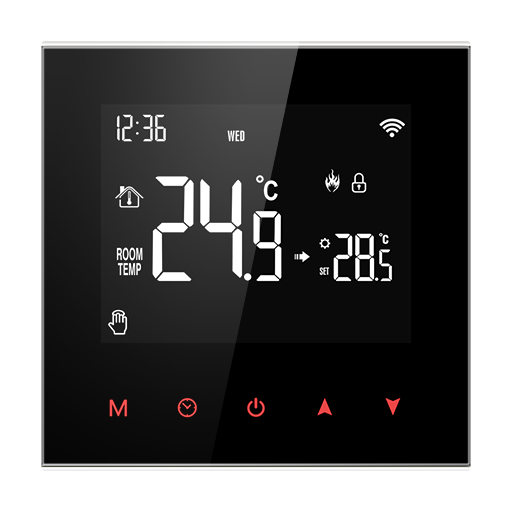 |
Options
How to use device type specific configuration
time_start: Reply to Tuya-specific time synchronization requests: "1970" - Reply with seconds since 1970/01/01 (recommended, should stop the device from asking), "2000" - Reply with seconds since 2000/01/01 (use if the weekday is wrong with 1970), "off" - Don't reply (use if replying causes too much traffic). Default for this device: "off". The value must be one of1970,2000,off
Exposes
State (binary)
On/off state of the device.. Value can be found in the published state on the state property. It's not possible to read (/get) this value. To write (/set) a value publish a message to topic zigbee2mqtt/FRIENDLY_NAME/set with payload {"state": NEW_VALUE}. If value equals ON state is ON, if OFF OFF.
Climate
This climate device supports the following features: current_heating_setpoint, local_temperature, local_temperature_calibration, running_state.
current_heating_setpoint: Temperature setpoint. To control publish a message to topiczigbee2mqtt/FRIENDLY_NAME/setwith payload{"current_heating_setpoint": VALUE}whereVALUEis the °C between5and95. Reading (/get) this attribute is not possible.local_temperature: Current temperature measured on the device (in °C). Reading (/get) this attribute is not possible.running_state: The current running state. Possible values are:idle,heat. Reading (/get) this attribute is not possible.local_temperature_calibration: Offset to add/subtract to the local temperature. To control publish a message to topiczigbee2mqtt/FRIENDLY_NAME/setwith payload{"local_temperature_calibration": VALUE}.The minimal value is-9.9and the maximum value is9.9with a step size of0.1.
Mode (enum)
Mode. Value can be found in the published state on the mode property. It's not possible to read (/get) this value. To write (/set) a value publish a message to topic zigbee2mqtt/FRIENDLY_NAME/set with payload {"mode": NEW_VALUE}. The possible values are: manual, program, temporary.
Child lock (binary)
Enables/disables physical input on the device. Value can be found in the published state on the child_lock property. It's not possible to read (/get) this value. To write (/set) a value publish a message to topic zigbee2mqtt/FRIENDLY_NAME/set with payload {"child_lock": NEW_VALUE}. If value equals LOCK child lock is ON, if UNLOCK OFF.
Fault (text)
Fault status. Value can be found in the published state on the fault property. It's not possible to read (/get) or write (/set) this value.
Upper temperature limit (numeric)
Upper temperature limit. Value can be found in the published state on the upper_temperature_limit property. It's not possible to read (/get) this value. To write (/set) a value publish a message to topic zigbee2mqtt/FRIENDLY_NAME/set with payload {"upper_temperature_limit": NEW_VALUE}. The minimal value is 15 and the maximum value is 95. The unit of this value is °C.
Frost protection (binary)
When the room temperature is lower than 5 ℃, the valve opens; when the temperature rises to 8 ℃, the valve closes.. Value can be found in the published state on the frost_protection property. It's not possible to read (/get) this value. To write (/set) a value publish a message to topic zigbee2mqtt/FRIENDLY_NAME/set with payload {"frost_protection": NEW_VALUE}. If value equals ON frost protection is ON, if OFF OFF.
Work days (enum)
Holiday option and turn off weekly programming.. Value can be found in the published state on the work_days property. It's not possible to read (/get) this value. To write (/set) a value publish a message to topic zigbee2mqtt/FRIENDLY_NAME/set with payload {"work_days": NEW_VALUE}. The possible values are: two-day weekend, single day off, no rest, turn off programming.
Sound (binary)
Value can be found in the published state on the sound property. It's not possible to read (/get) this value. To write (/set) a value publish a message to topic zigbee2mqtt/FRIENDLY_NAME/set with payload {"sound": NEW_VALUE}. If value equals ON sound is ON, if OFF OFF.
Sensor selection (enum)
Select sensors for temperature measurement.. Value can be found in the published state on the sensor_selection property. It's not possible to read (/get) this value. To write (/set) a value publish a message to topic zigbee2mqtt/FRIENDLY_NAME/set with payload {"sensor_selection": NEW_VALUE}. The possible values are: in, out, all.
Temperature variation (numeric)
Temperature difference setting for heating activation. Value can be found in the published state on the temperature_variation property. It's not possible to read (/get) this value. To write (/set) a value publish a message to topic zigbee2mqtt/FRIENDLY_NAME/set with payload {"temperature_variation": NEW_VALUE}. The minimal value is 0.5 and the maximum value is 10. The unit of this value is °C.
Sensor temperature limit (numeric)
Temperature limit for sensors. Value can be found in the published state on the sensor_temperature_limit property. It's not possible to read (/get) this value. To write (/set) a value publish a message to topic zigbee2mqtt/FRIENDLY_NAME/set with payload {"sensor_temperature_limit": NEW_VALUE}. The minimal value is 25 and the maximum value is 95. The unit of this value is °C.
Weekly schedule (composite)
Time-temperature schedule: 6 workday periods + 2 weekend periods. Can be set by publishing to zigbee2mqtt/FRIENDLY_NAME/set with payload {"weekly_schedule": {"workday_hour_1": VALUE, "workday_minute_1": VALUE, "workday_temp_1": VALUE, "workday_hour_2": VALUE, "workday_minute_2": VALUE, "workday_temp_2": VALUE, "workday_hour_3": VALUE, "workday_minute_3": VALUE, "workday_temp_3": VALUE, "workday_hour_4": VALUE, "workday_minute_4": VALUE, "workday_temp_4": VALUE, "workday_hour_5": VALUE, "workday_minute_5": VALUE, "workday_temp_5": VALUE, "workday_hour_6": VALUE, "workday_minute_6": VALUE, "workday_temp_6": VALUE, "weekend_hour_1": VALUE, "weekend_minute_1": VALUE, "weekend_temp_1": VALUE, "weekend_hour_2": VALUE, "weekend_minute_2": VALUE, "weekend_temp_2": VALUE}}
workday_hour_1(numeric): Hour of workday period 1 max value is 23workday_minute_1(numeric): Minute of workday period 1 max value is 59workday_temp_1(numeric): Target temperature of workday period 1 min value is 5, max value is 95, unit is °Cworkday_hour_2(numeric): Hour of workday period 2 max value is 23workday_minute_2(numeric): Minute of workday period 2 max value is 59workday_temp_2(numeric): Target temperature of workday period 2 min value is 5, max value is 95, unit is °Cworkday_hour_3(numeric): Hour of workday period 3 max value is 23workday_minute_3(numeric): Minute of workday period 3 max value is 59workday_temp_3(numeric): Target temperature of workday period 3 min value is 5, max value is 95, unit is °Cworkday_hour_4(numeric): Hour of workday period 4 max value is 23workday_minute_4(numeric): Minute of workday period 4 max value is 59workday_temp_4(numeric): Target temperature of workday period 4 min value is 5, max value is 95, unit is °Cworkday_hour_5(numeric): Hour of workday period 5 max value is 23workday_minute_5(numeric): Minute of workday period 5 max value is 59workday_temp_5(numeric): Target temperature of workday period 5 min value is 5, max value is 95, unit is °Cworkday_hour_6(numeric): Hour of workday period 6 max value is 23workday_minute_6(numeric): Minute of workday period 6 max value is 59workday_temp_6(numeric): Target temperature of workday period 6 min value is 5, max value is 95, unit is °Cweekend_hour_1(numeric): Hour of weekend period 1 max value is 23weekend_minute_1(numeric): Minute of weekend period 1 max value is 59weekend_temp_1(numeric): Target temperature of weekend period 1 min value is 5, max value is 95, unit is °Cweekend_hour_2(numeric): Hour of weekend period 2 max value is 23weekend_minute_2(numeric): Minute of weekend period 2 max value is 59weekend_temp_2(numeric): Target temperature of weekend period 2 min value is 5, max value is 95, unit is °C
Backlight (enum)
The backlight brightness.. Value can be found in the published state on the backlight property. It's not possible to read (/get) this value. To write (/set) a value publish a message to topic zigbee2mqtt/FRIENDLY_NAME/set with payload {"backlight": NEW_VALUE}. The possible values are: off, micro light, medium light, high light.
Direction mode (binary)
ON: secondary_reversal, OFF: primary_reversal. Value can be found in the published state on the direction_mode property. It's not possible to read (/get) this value. To write (/set) a value publish a message to topic zigbee2mqtt/FRIENDLY_NAME/set with payload {"direction_mode": NEW_VALUE}. If value equals ON direction mode is ON, if OFF OFF.