
EyZEE _TZE284_0kihjsys
| Model | _TZE284_0kihjsys |
| Vendor | EyZEE |
| Description | 5-Gang TZExxx Zigbee Touch Switch |
| Exposes | switch (state), couple_decouple, indicator_mode, restart_status_1, restart_status_2, restart_status_3, restart_status_4, restart_status_5, restart_status |
| Picture | 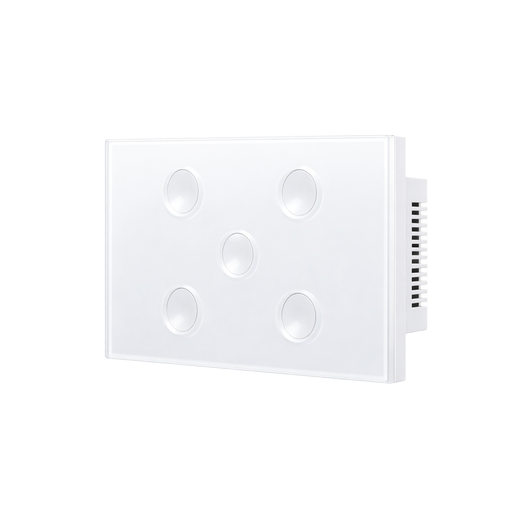 |
Options
How to use device type specific configuration
time_start: Reply to Tuya-specific time synchronization requests: "1970" - Reply with seconds since 1970/01/01 (recommended, should stop the device from asking), "2000" - Reply with seconds since 2000/01/01 (use if the weekday is wrong with 1970), "off" - Don't reply (use if replying causes too much traffic). Default for this device: "off". The value must be one of1970,2000,off
Exposes
Switch (l1 endpoint)
The current state of this switch is in the published state under the state_l1 property (value is ON or OFF). To control this switch publish a message to topic zigbee2mqtt/FRIENDLY_NAME/set with payload {"state_l1": "ON"}, {"state_l1": "OFF"} or {"state_l1": "TOGGLE"}. To read the current state of this switch publish a message to topic zigbee2mqtt/FRIENDLY_NAME/get with payload {"state_l1": ""}.
Switch (l2 endpoint)
The current state of this switch is in the published state under the state_l2 property (value is ON or OFF). To control this switch publish a message to topic zigbee2mqtt/FRIENDLY_NAME/set with payload {"state_l2": "ON"}, {"state_l2": "OFF"} or {"state_l2": "TOGGLE"}. To read the current state of this switch publish a message to topic zigbee2mqtt/FRIENDLY_NAME/get with payload {"state_l2": ""}.
Switch (l3 endpoint)
The current state of this switch is in the published state under the state_l3 property (value is ON or OFF). To control this switch publish a message to topic zigbee2mqtt/FRIENDLY_NAME/set with payload {"state_l3": "ON"}, {"state_l3": "OFF"} or {"state_l3": "TOGGLE"}. To read the current state of this switch publish a message to topic zigbee2mqtt/FRIENDLY_NAME/get with payload {"state_l3": ""}.
Switch (l4 endpoint)
The current state of this switch is in the published state under the state_l4 property (value is ON or OFF). To control this switch publish a message to topic zigbee2mqtt/FRIENDLY_NAME/set with payload {"state_l4": "ON"}, {"state_l4": "OFF"} or {"state_l4": "TOGGLE"}. To read the current state of this switch publish a message to topic zigbee2mqtt/FRIENDLY_NAME/get with payload {"state_l4": ""}.
Switch (l5 endpoint)
The current state of this switch is in the published state under the state_l5 property (value is ON or OFF). To control this switch publish a message to topic zigbee2mqtt/FRIENDLY_NAME/set with payload {"state_l5": "ON"}, {"state_l5": "OFF"} or {"state_l5": "TOGGLE"}. To read the current state of this switch publish a message to topic zigbee2mqtt/FRIENDLY_NAME/get with payload {"state_l5": ""}.
Couple decouple (binary)
Effective with EyZEE Decouplar switch only. Couple/Decouple: Click ON, then DOUBLE-TAP the physical button to activate Decouple mode. Click OFF, then DOUBLE-TAP the physical button to deactivate Decouple mode.. Value can be found in the published state on the couple_decouple property. It's not possible to read (/get) this value. To write (/set) a value publish a message to topic zigbee2mqtt/FRIENDLY_NAME/set with payload {"couple_decouple": NEW_VALUE}. If value equals ON couple decouple is ON, if OFF OFF.
Indicator mode (enum)
Indicator Mode: off=Backlight off, on_off_status=Red ON / Blue OFF, switch_position=Pink ON / Off when OFF. Value can be found in the published state on the indicator_mode property. It's not possible to read (/get) this value. To write (/set) a value publish a message to topic zigbee2mqtt/FRIENDLY_NAME/set with payload {"indicator_mode": NEW_VALUE}. The possible values are: off, on_off_status, switch_position.
Restart status 1 (enum)
Power-on behavior for Switch 1. Value can be found in the published state on the restart_status_1 property. It's not possible to read (/get) this value. To write (/set) a value publish a message to topic zigbee2mqtt/FRIENDLY_NAME/set with payload {"restart_status_1": NEW_VALUE}. The possible values are: off, on, previous.
Restart status 2 (enum)
Power-on behavior for Switch 2. Value can be found in the published state on the restart_status_2 property. It's not possible to read (/get) this value. To write (/set) a value publish a message to topic zigbee2mqtt/FRIENDLY_NAME/set with payload {"restart_status_2": NEW_VALUE}. The possible values are: off, on, previous.
Restart status 3 (enum)
Power-on behavior for Switch 3. Value can be found in the published state on the restart_status_3 property. It's not possible to read (/get) this value. To write (/set) a value publish a message to topic zigbee2mqtt/FRIENDLY_NAME/set with payload {"restart_status_3": NEW_VALUE}. The possible values are: off, on, previous.
Restart status 4 (enum)
Power-on behavior for Switch 4. Value can be found in the published state on the restart_status_4 property. It's not possible to read (/get) this value. To write (/set) a value publish a message to topic zigbee2mqtt/FRIENDLY_NAME/set with payload {"restart_status_4": NEW_VALUE}. The possible values are: off, on, previous.
Restart status 5 (enum)
Power-on behavior for Switch 5. Value can be found in the published state on the restart_status_5 property. It's not possible to read (/get) this value. To write (/set) a value publish a message to topic zigbee2mqtt/FRIENDLY_NAME/set with payload {"restart_status_5": NEW_VALUE}. The possible values are: off, on, previous.
Restart status (binary)
Global power restoration status. Value can be found in the published state on the restart_status property. It's not possible to read (/get) this value. To write (/set) a value publish a message to topic zigbee2mqtt/FRIENDLY_NAME/set with payload {"restart_status": NEW_VALUE}. If value equals ON restart status is ON, if OFF OFF.