
Onesti Products AS NimlyCodePRO
| Model | NimlyCodePRO |
| Vendor | Onesti Products AS |
| Description | Zigbee module for Nimly Code PRO |
| Exposes | lock (state, lock_state), battery, sound_volume, voltage, last_unlock_source, last_unlock_user, last_lock_source, last_lock_user, last_used_pin_code, action, action_user, action_source_name, auto_relock, auto_relock_time, num_pin_users, min_pin_length, max_pin_length, pin_code, last_successful_pincode_clear, last_successful_pincode_save |
| Picture | 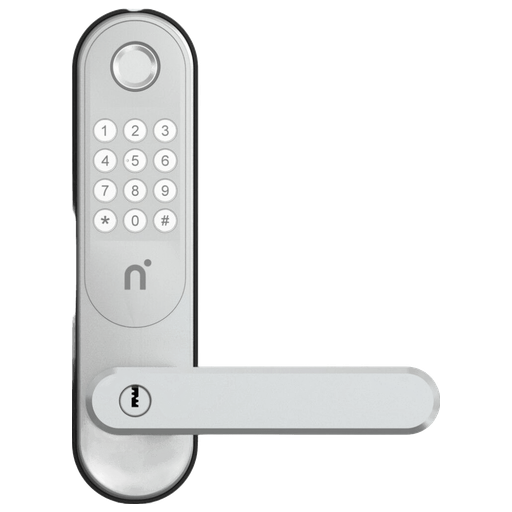 |
Exposes
Lock
The current state of this lock is in the published state under the state property (value is LOCK or UNLOCK). To control this lock publish a message to topic zigbee2mqtt/FRIENDLY_NAME/set with payload {"state": "LOCK"} or {"state": "UNLOCK"}. To read the current state of this lock publish a message to topic zigbee2mqtt/FRIENDLY_NAME/get with payload {"state": ""}. This lock exposes a lock state which can be found in the published state under the lock_state property. It's not possible to read (/get) or write (/set) this value. The possible values are: not_fully_locked, locked, unlocked.
Battery (numeric)
Remaining battery in %, can take up to 24 hours before reported. Value can be found in the published state on the battery property. It's not possible to read (/get) or write (/set) this value. The minimal value is 0 and the maximum value is 100. The unit of this value is %.
Sound volume (enum)
Sound volume of the lock. Value can be found in the published state on the sound_volume property. To read (/get) the value publish a message to topic zigbee2mqtt/FRIENDLY_NAME/get with payload {"sound_volume": ""}. To write (/set) a value publish a message to topic zigbee2mqtt/FRIENDLY_NAME/set with payload {"sound_volume": "VALUE"}. The possible values are: silent_mode, low_volume, high_volume.
Voltage (numeric)
Battery voltage. Value can be found in the published state on the voltage property. It's not possible to read (/get) or write (/set) this value. The unit of this value is mV.
Last unlock source (enum)
Last unlock source. Value can be found in the published state on the last_unlock_source property. It's not possible to read (/get) or write (/set) this value. The possible values are: zigbee, keypad, fingerprintsensor, rfid, unattributed, self, unknown.
Last unlock user (text)
Last unlock user (slot number). Value can be found in the published state on the last_unlock_user property. It's not possible to read (/get) or write (/set) this value.
Last lock source (enum)
Last lock source. Value can be found in the published state on the last_lock_source property. It's not possible to read (/get) or write (/set) this value. The possible values are: zigbee, keypad, fingerprintsensor, rfid, unattributed, self, unknown.
Last lock user (text)
Last lock user (slot number). Value can be found in the published state on the last_lock_user property. It's not possible to read (/get) or write (/set) this value.
Last used pin code (text)
Last used pin code (actual digits). Value can be found in the published state on the last_used_pin_code property. It's not possible to read (/get) or write (/set) this value.
Action (text)
Last action. Value can be found in the published state on the action property. It's not possible to read (/get) or write (/set) this value.
Action user (numeric)
User slot that triggered the last action. Value can be found in the published state on the action_user property. It's not possible to read (/get) or write (/set) this value.
Action source name (enum)
Source of the last action. Value can be found in the published state on the action_source_name property. It's not possible to read (/get) or write (/set) this value. The possible values are: zigbee, keypad, fingerprintsensor, rfid, unattributed, self, unknown.
Auto relock (binary)
Auto relock after 7 seconds.. Value can be found in the published state on the auto_relock property. It's not possible to read (/get) this value. To write (/set) a value publish a message to topic zigbee2mqtt/FRIENDLY_NAME/set with payload {"auto_relock": VALUE}. If value equals true auto relock is ON, if false OFF.
Auto relock time (numeric)
Auto relock delay in seconds. Value can be found in the published state on the auto_relock_time property. It's not possible to read (/get) this value. To write (/set) a value publish a message to topic zigbee2mqtt/FRIENDLY_NAME/set with payload {"auto_relock_time": VALUE}. The minimal value is 0 and the maximum value is 255. The unit of this value is s.
Num pin users (numeric)
Number of PIN code users supported. Value can be found in the published state on the num_pin_users property. It's not possible to read (/get) or write (/set) this value.
Min pin length (numeric)
Minimum PIN code length. Value can be found in the published state on the min_pin_length property. It's not possible to read (/get) or write (/set) this value.
Max pin length (numeric)
Maximum PIN code length. Value can be found in the published state on the max_pin_length property. It's not possible to read (/get) or write (/set) this value.
Pin code (composite)
Can be set by publishing to zigbee2mqtt/FRIENDLY_NAME/set with payload {"pin_code": {"user": VALUE, "user_type": "VALUE", "user_enabled": VALUE, "pin_code": VALUE}} To read (/get) the value publish a message to topic zigbee2mqtt/FRIENDLY_NAME/get with payload {"pin_code": ""}.
user(numeric): User ID to set or clear the pincode foruser_type(enum): Type of user, unrestricted: owner (default), (year|week)_day_schedule: user has ability to open lock based on specific time period, master: user has ability to both program and operate the door lock, non_access: user is recognized by the lock but does not have the ability to open the lock allowed values:unrestricted,year_day_schedule,week_day_schedule,master,non_accessuser_enabled(binary): Whether the user is enabled/disabled allowed values:trueorfalsepin_code(numeric): Pincode to set, set pincode to null to clear
Last successful pincode clear (text)
Last deleted Pincode. Value can be found in the published state on the last_successful_pincode_clear property. It's not possible to read (/get) or write (/set) this value.
Last successful pincode save (text)
Last saved Pincode. Value can be found in the published state on the last_successful_pincode_save property. It's not possible to read (/get) or write (/set) this value.