
Salus Controls SQ610RFNH
| Model | SQ610RFNH |
| Vendor | Salus Controls |
| Description | Quantum wireless thermostat |
| Exposes | climate (current_heating_setpoint, local_temperature, system_mode, running_state), humidity, battery, child_lock, wiring_centre_zones |
| Picture | 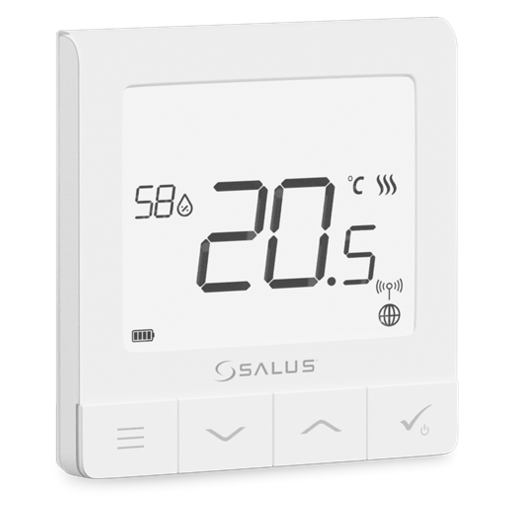 |
Notes
This device is also sold under the Neotherm brand in Denmark.
Pairing
The thermostat only finishes pairing when the coordinator answers a Salus specific greeting, which this converter does.
- Factory reset the thermostat.
- Permit join on the whole network, with the thermostat close to a router or the coordinator: publish
{"time": 254}tozigbee2mqtt/bridge/request/permit_join. Do not limit it to a Salus wiring centre: a thermostat associated with it 50+ times and never received the network key. In one test a router accepted the thermostat and dropped it again before the key exchange. - Start pairing on the thermostat.
"Go to the Smart Home app"
After pairing, the display shows "go to the Smart Home app" and the buttons do nothing until the thermostat is paired with a receiver, such as a wiring centre zone. The Salus gateway behaves the same way. Readings and writes from Zigbee2MQTT work in that state.
Standalone / Direct Relay Workaround
If using the thermostat standalone (controlling heating directly via onboard relays, or without a Salus KL08RF wiring centre), you can bypass this lock screen:
- In the initial first-boot setup wizard, select NO when prompted to connect to a network.
- Complete the initial offline setup (language, system type, time, etc.) until the thermostat reaches the standard temperature home screen.
- Hold the ✓ button for 3–5 seconds to enter the Admin Settings menu.
- Select Join Network (or navigate to network settings to initiate pairing).
- Enable
permit_joinin Zigbee2MQTT.
The thermostat will pair cleanly to Zigbee2MQTT while retaining the standard home screen and fully functioning physical buttons, avoiding the "go to the Smart Home app" lock.
Wiring centre zones
wiring_centre_zones pairs the thermostat with zones of a wiring centre (KL08RF / it600WC) on the same Zigbee2MQTT network: the zone numbers 1 to 8 separated by commas, for example 1,4, and replace in front, for example replace 1,4, to take over a zone that another thermostat holds. It is done when the wiring centre's zone table shows the thermostat in all the zones, and it fails if the table does not within 20 s per zone. There is no unpairing yet. Adding the wiring centre itself is on the KL08RF page.
Underneath it sends the B47 command described in PROTOCOL.md section 7. It was tested with a KL08RF on the same Zigbee2MQTT network: pairing, several zones, and the zone relays following the thermostats' demand.
Clock
The thermostat gets its clock and summer time from Zigbee2MQTT, in the time zone Zigbee2MQTT runs in. In Docker that is UTC unless TZ is set, for example TZ=Europe/Copenhagen.
Slow writes
The thermostat is a battery powered sleepy end device. A write waits until it next polls its parent, about every 7 s, so a change can take up to about 30 s to be confirmed.
Firmware updates
The firmware images are standard Zigbee OTA files (manufacturer 0x1078, image type 0x7A). An update from 0x50 to 0x54 took about 1.5 h. If the image you want is not in the OTA index yet, add it to a local OTA index.
Temperature resolution
A factory new thermostat reports the temperature in 0.5 °C steps, the resolution of its display. The thermostat can be set to 0.1 °C. display_resolution shows which one is set and sets it, 0.5 or 0.1. It is an admin setting, written with the same B11 as heat_control. min_heat_setpoint and max_heat_setpoint are written the same way. max_heat_setpoint has been written on real thermostats; min_heat_setpoint has not been tried yet.
OTA updates
This device supports OTA updates, for more information see OTA updates.
Options
How to use device type specific configuration
humidity_calibration: Calibrates the humidity value (absolute offset), takes into effect on next report of device. The value must be a number.humidity_precision: Number of digits after decimal point for humidity, takes into effect on next report of device. This option can only decrease the precision, not increase it. The value must be a number with a minimum value of0and with a maximum value of3
Exposes
Climate
This climate device supports the following features: current_heating_setpoint, local_temperature, system_mode, running_state.
current_heating_setpoint: Temperature setpoint. To control publish a message to topiczigbee2mqtt/FRIENDLY_NAME/setwith payload{"current_heating_setpoint": VALUE}whereVALUEis the °C between5and40. Reading (/get) this attribute is not possible.local_temperature: Current temperature measured on the device (in °C). Reading (/get) this attribute is not possible.system_mode: Mode of this device. To control publish a message to topiczigbee2mqtt/FRIENDLY_NAME/setwith payload{"system_mode": "VALUE"}whereVALUEis one of:off,heat,cool. Reading (/get) this attribute is not possible.running_state: The current running state. Possible values are:idle,heat. Reading (/get) this attribute is not possible.
Humidity (numeric)
Measured relative humidity. Value can be found in the published state on the humidity property. It's not possible to read (/get) or write (/set) this value. The unit of this value is %.
Battery (numeric)
Remaining battery in %, can take up to 24 hours before reported. Value can be found in the published state on the battery property. It's not possible to read (/get) or write (/set) this value. The minimal value is 0 and the maximum value is 100. The unit of this value is %.
Child lock (binary)
Enables/disables physical input on the device. Value can be found in the published state on the child_lock property. It's not possible to read (/get) this value. To write (/set) a value publish a message to topic zigbee2mqtt/FRIENDLY_NAME/set with payload {"child_lock": "VALUE"}. If value equals LOCK child lock is ON, if UNLOCK OFF.
Wiring centre zones (list)
Pairs the thermostat with these wiring centre zones, taking them over from any other thermostat. Can be set by publishing to zigbee2mqtt/FRIENDLY_NAME/set with payload {"wiring_centre_zones": []}