
Aqara SP-P06E
| Model | SP-P06E |
| Vendor | Aqara |
| Description | Outdoor plug H2 EU |
| Exposes | switch (state), power_outage_count, power_on_behavior, power, energy, current, overload_protection, led_indicator, flip_indicator_light, child_lock, charging_protection, identify |
| Picture | 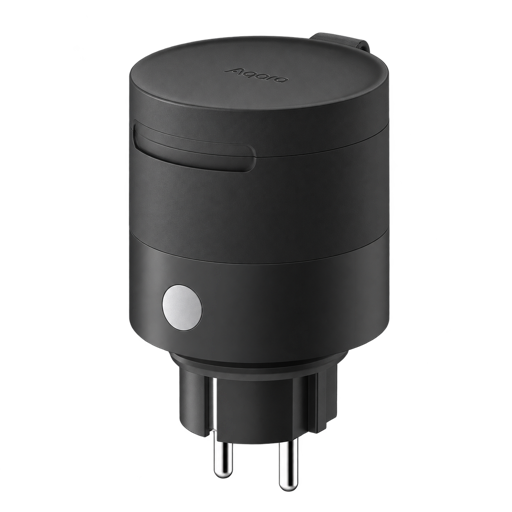 |
OTA updates
This device supports OTA updates, for more information see OTA updates.
Options
How to use device type specific configuration
power_calibration: Calibrates the power value (percentual offset), takes into effect on next report of device. The value must be a number.power_precision: Number of digits after decimal point for power, takes into effect on next report of device. This option can only decrease the precision, not increase it. The value must be a number with a minimum value of0and with a maximum value of3energy_calibration: Calibrates the energy value (percentual offset), takes into effect on next report of device. The value must be a number.energy_precision: Number of digits after decimal point for energy, takes into effect on next report of device. This option can only decrease the precision, not increase it. The value must be a number with a minimum value of0and with a maximum value of3current_calibration: Calibrates the current value (percentual offset), takes into effect on next report of device. The value must be a number.current_precision: Number of digits after decimal point for current, takes into effect on next report of device. This option can only decrease the precision, not increase it. The value must be a number with a minimum value of0and with a maximum value of3identify_timeout: Sets the duration of the identification procedure in seconds (i.e., how long the device would flash).The value ranges from 1 to 30 seconds (default: 3). The value must be a number with a minimum value of1and with a maximum value of30state_action: State actions will also be published as 'action' when true (default false). The value must betrueorfalse
Exposes
Switch
The current state of this switch is in the published state under the state property (value is ON or OFF). To control this switch publish a message to topic zigbee2mqtt/FRIENDLY_NAME/set with payload {"state": "ON"}, {"state": "OFF"} or {"state": "TOGGLE"}. To read the current state of this switch publish a message to topic zigbee2mqtt/FRIENDLY_NAME/get with payload {"state": ""}.
On with timed off
When setting the state to ON, it might be possible to specify an automatic shutoff after a certain amount of time. To do this add an additional property on_time to the payload which is the time in seconds the state should remain on. Additionally an off_wait_time property can be added to the payload to specify the cooldown time in seconds when the switch will not answer to other on with timed off commands. Support depends on the switch firmware. Some devices might require both on_time and off_wait_time to work Examples : {"state" : "ON", "on_time": 300}, {"state" : "ON", "on_time": 300, "off_wait_time": 120}.
Power outage count (numeric)
Number of power outages (since last pairing). Value can be found in the published state on the power_outage_count property. It's not possible to read (/get) or write (/set) this value.
Power on behavior (enum)
Controls the behavior when the device is powered on after power loss. Value can be found in the published state on the power_on_behavior property. To read (/get) the value publish a message to topic zigbee2mqtt/FRIENDLY_NAME/get with payload {"power_on_behavior": ""}. To write (/set) a value publish a message to topic zigbee2mqtt/FRIENDLY_NAME/set with payload {"power_on_behavior": "VALUE"}. The possible values are: on, previous, off, inverted.
Power (numeric)
Instantaneous measured power. Value can be found in the published state on the power property. To read (/get) the value publish a message to topic zigbee2mqtt/FRIENDLY_NAME/get with payload {"power": ""}. It's not possible to write (/set) this value. The unit of this value is W.
Energy (numeric)
Sum of consumed energy. Value can be found in the published state on the energy property. It's not possible to read (/get) or write (/set) this value. The unit of this value is kWh.
Current (numeric)
Instantaneous measured electrical current. Value can be found in the published state on the current property. It's not possible to read (/get) or write (/set) this value. The unit of this value is A.
Overload protection (numeric)
Maximum allowed load, turns off if exceeded. Value can be found in the published state on the overload_protection property. To read (/get) the value publish a message to topic zigbee2mqtt/FRIENDLY_NAME/get with payload {"overload_protection": ""}. To write (/set) a value publish a message to topic zigbee2mqtt/FRIENDLY_NAME/set with payload {"overload_protection": VALUE}. The minimal value is 100 and the maximum value is 3840. The unit of this value is W.
Led indicator (binary)
LED indicator. Value can be found in the published state on the led_indicator property. To read (/get) the value publish a message to topic zigbee2mqtt/FRIENDLY_NAME/get with payload {"led_indicator": ""}. To write (/set) a value publish a message to topic zigbee2mqtt/FRIENDLY_NAME/set with payload {"led_indicator": "VALUE"}. If value equals ON led indicator is ON, if OFF OFF.
Flip indicator light (binary)
After turn on, the indicator light turns on while switch is off, and vice versa. Value can be found in the published state on the flip_indicator_light property. To read (/get) the value publish a message to topic zigbee2mqtt/FRIENDLY_NAME/get with payload {"flip_indicator_light": ""}. To write (/set) a value publish a message to topic zigbee2mqtt/FRIENDLY_NAME/set with payload {"flip_indicator_light": "VALUE"}. If value equals ON flip indicator light is ON, if OFF OFF.
Child lock (binary)
Disables the physical button. Value can be found in the published state on the child_lock property. To read (/get) the value publish a message to topic zigbee2mqtt/FRIENDLY_NAME/get with payload {"child_lock": ""}. To write (/set) a value publish a message to topic zigbee2mqtt/FRIENDLY_NAME/set with payload {"child_lock": "VALUE"}. If value equals LOCK child lock is ON, if UNLOCK OFF.
Charging protection (binary)
Turn off the plug if the power is below 3W for half an hour. Value can be found in the published state on the charging_protection property. To read (/get) the value publish a message to topic zigbee2mqtt/FRIENDLY_NAME/get with payload {"charging_protection": ""}. To write (/set) a value publish a message to topic zigbee2mqtt/FRIENDLY_NAME/set with payload {"charging_protection": "VALUE"}. If value equals ON charging protection is ON, if OFF OFF.
Identify (enum)
Initiate device identification. Value will not be published in the state. It's not possible to read (/get) this value. To write (/set) a value publish a message to topic zigbee2mqtt/FRIENDLY_NAME/set with payload {"identify": "VALUE"}. The possible values are: identify.