
Salus Controls KL08RF
| Model | KL08RF |
| Vendor | Salus Controls |
| Description | iT600 8-zone wiring centre |
| Exposes | |
| Picture | 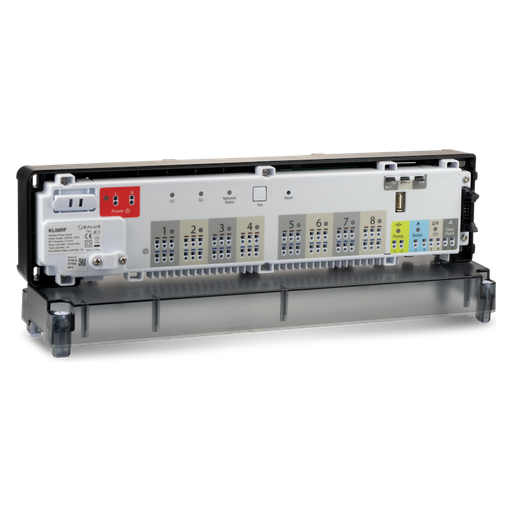 |
Notes
This device is also sold under the Neotherm brand in Denmark.
Pairing
The wiring centre sends the same Salus specific greeting as the SQ610RFNH thermostat when it joins, and leaves again if nobody answers it. This converter answers it, and gives the wiring centre device number 1. Only one wiring centre per Zigbee network is supported.
- Factory reset the wiring centre: hold Pair for 15 s until G1 and G2 turn red and go off. Its paired thermostats leave the network too, so they have to join and be paired again.
- Cut its mains power and wait until the network LED has gone dark. A short cut is not enough: the radio keeps running, and after a reset the wiring centre does not look for a network by itself.
- Permit join on the whole network: publish
{"time": 254}tozigbee2mqtt/bridge/request/permit_join. Do not limit it to the wiring centre when you join thermostats. - Switch the wiring centre on. It joins at once and is recognised as a KL08RF.
Zones
The wiring centre reports which thermostat holds which zone. zone_1 to zone_8 show the IEEE address of the thermostat in each zone, or its short address when no device has it (a thermostat that rejoined under a new one), and null while the zone is free. It reports the table by itself after each pairing and at boot, and a get on any zone asks for it again.
A zone is paired from the thermostat, not from the wiring centre: set wiring_centre_zones on the thermostat, see Wiring centre zones. The thermostat leaves "go to the Smart Home app" when its zone is paired. A zone that another thermostat holds is refused unless the command has the replace flag, and the wiring centre then reports the thermostat it replaced as replaced_thermostat.
From then on the thermostats send their demand to the wiring centre, which switches the zone relays and the pump and boiler outputs.
Firmware updates
The wiring centre lists the OTA client cluster (0x0019), and Salus ships its firmware as standard Zigbee OTA files. The OTA index has the image of the version it runs (20230222) under the manufacturer name SalusControls, which the definition uses, and Zigbee2MQTT matches the wiring centre to it. No newer image exists yet, so a transfer has not been tried.
OTA updates
This device supports OTA updates, for more information see OTA updates.