
Appartme APRM-04-005
| Model | APRM-04-005 |
| Vendor | Appartme |
| Description | Thermostatic radiator valve Zigbee 2.0 |
| Exposes | climate (current_heating_setpoint, local_temperature, local_temperature_calibration, system_mode, preset), child_lock, battery, window_detection, window_open, valve_testing |
| Picture | 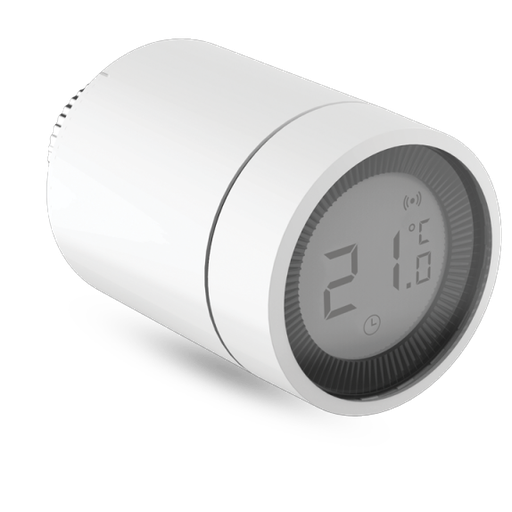 |
Options
How to use device type specific configuration
time_start: Reply to Tuya-specific time synchronization requests: "1970" - Reply with seconds since 1970/01/01 (recommended, should stop the device from asking), "2000" - Reply with seconds since 2000/01/01 (use if the weekday is wrong with 1970), "off" - Don't reply (use if replying causes too much traffic). Default for this device: "off". The value must be one of1970,2000,off
Exposes
Climate
This climate device supports the following features: current_heating_setpoint, local_temperature, local_temperature_calibration, system_mode, preset.
current_heating_setpoint: Temperature setpoint. To control publish a message to topiczigbee2mqtt/FRIENDLY_NAME/setwith payload{"current_heating_setpoint": VALUE}whereVALUEis the °C between5and30. Reading (/get) this attribute is not possible.local_temperature: Current temperature measured on the device (in °C). Reading (/get) this attribute is not possible.system_mode: heat = manual mode, off = anti-freeze mode. To control publish a message to topiczigbee2mqtt/FRIENDLY_NAME/setwith payload{"system_mode": "VALUE"}whereVALUEis one of:heat,off. Reading (/get) this attribute is not possible.preset: Mode of this device (similar to system_mode). To control publish a message to topiczigbee2mqtt/FRIENDLY_NAME/setwith payload{"preset": "VALUE"}whereVALUEis one of:schedule,manual,antifrost. Reading (/get) this attribute is not possible.local_temperature_calibration: Offset to add/subtract to the local temperature. To control publish a message to topiczigbee2mqtt/FRIENDLY_NAME/setwith payload{"local_temperature_calibration": VALUE}.The minimal value is-5and the maximum value is5with a step size of0.5.
Child lock (binary)
Enables/disables physical input on the device. Value can be found in the published state on the child_lock property. It's not possible to read (/get) this value. To write (/set) a value publish a message to topic zigbee2mqtt/FRIENDLY_NAME/set with payload {"child_lock": "VALUE"}. If value equals LOCK child lock is ON, if UNLOCK OFF.
Battery (numeric)
Remaining battery in %, can take up to 24 hours before reported. Value can be found in the published state on the battery property. It's not possible to read (/get) or write (/set) this value. The minimal value is 0 and the maximum value is 100. The unit of this value is %.
Window detection (binary)
Enables/disables window detection on the device. Value can be found in the published state on the window_detection property. It's not possible to read (/get) this value. To write (/set) a value publish a message to topic zigbee2mqtt/FRIENDLY_NAME/set with payload {"window_detection": VALUE}. If value equals true window detection is ON, if false OFF.
Window open (binary)
Indicates if window is open. Value can be found in the published state on the window_open property. It's not possible to read (/get) or write (/set) this value. If value equals true window open is ON, if false OFF.
Valve testing (binary)
Valve test, the valve opens and closes while F1 is displayed. Value can be found in the published state on the valve_testing property. It's not possible to read (/get) this value. To write (/set) a value publish a message to topic zigbee2mqtt/FRIENDLY_NAME/set with payload {"valve_testing": VALUE}. If value equals true valve testing is ON, if false OFF.